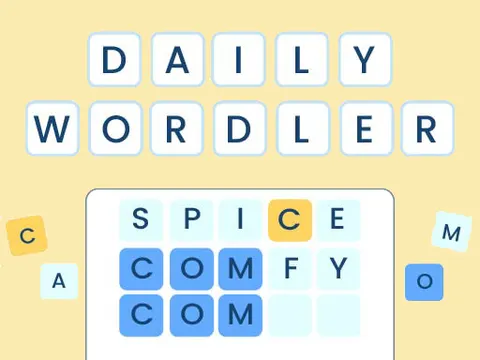
Daily Wordler unblocked is a word-guessing puzzle that rewards sharp logic as much as a big vocabulary. Each guess you enter lights up with color-coded hints that tell you which letters belong in the hidden word and where they go. Fans of Wordle-style brain teasers can sharpen their skills on Classroom 7x.
About Daily Wordler
The goal is easy to explain and tricky to master. A secret word is hidden on the board, and you uncover it by typing in real, valid words as guesses. After each attempt, the tiles change color to give you feedback. A yellow tile means the letter is in the word but sitting in the wrong position, while a blue tile means the letter is correct and in exactly the right place. Using those clues, you narrow down the possibilities one guess at a time.
If you have played Wordle, you will feel at home right away, but note one key difference: correct letters in the right spot glow blue here instead of green. That small change can trip up experienced players for the first few rounds. The game makes a great mental warm-up, and it quietly builds spelling skills and pattern recognition while you play. Every solved word feels like a small victory, and every failed guess still teaches you something about the answer.
How to Play Daily Wordler
- Type a valid word as your first guess and submit it to see which letters light up.
- Read the colors: yellow means right letter in the wrong spot, blue means right letter in the right spot.
- Keep blue letters locked in place for your next guess and move yellow letters to new positions.
- Avoid letters that did not light up at all, since they are unlikely to be in the hidden word.
- Continue guessing and narrowing down the options until you reveal the hidden word.
Daily Wordler Controls
| Input | Action |
|---|---|
| Keyboard / Mouse | Enter the letters of your guess |
| Enter | Submit your guess |
Tips and Tricks
- Open with a word packed with common letters, such as A, E, R, S or T, to uncover as much information as possible right away.
- Never waste a guess on a letter you already ruled out. Every slot should test something new or confirm a known clue.
- Remember that blue, not green, marks a perfectly placed letter in this game, so double-check the colors before planning your next move.
- If you are stuck between several similar words, guess a word that tests multiple uncertain letters at once instead of trying each option in turn.
- Keep in mind that letters can repeat. If the clues are not adding up, a double letter may be the missing piece.
Game Info
| Game | Daily Wordler |
|---|---|
| Genre | Puzzle |
| Players | Single player |
| Works on | Chromebook, PC and Mac (keyboard recommended) |
| Price | Free, no sign-up |
Daily Wordler FAQ
What do the colors mean in Daily Wordler?
A yellow tile means the letter appears in the hidden word but in a different position. A blue tile means the letter is correct and already in the right spot. Letters that light up in neither color are most likely not in the word.
How is Daily Wordler different from Wordle?
The basic idea is the same, guessing a hidden word with color feedback, but this version marks letters in the correct spot with blue tiles rather than green. Yellow still means a correct letter in the wrong position.
Can you guess any combination of letters?
No. Each guess has to be a valid word, so random strings of letters will not work. That rule makes every guess count and pushes you to think about real words that fit the clues you have.
Can I play Daily Wordler on a school Chromebook?
Yes. Daily Wordler runs in the Chrome browser on Chromebooks, Windows PCs and Macs with nothing to install. It is designed for a keyboard and mouse, so it plays best on a computer rather than a phone.
Is Daily Wordler free to play?
Yes, Daily Wordler is completely free on Classroom 7x. There is no download, no account and no sign-up. Press Play and the game loads right on this page.