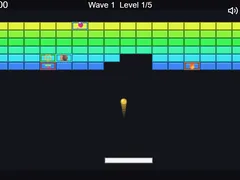
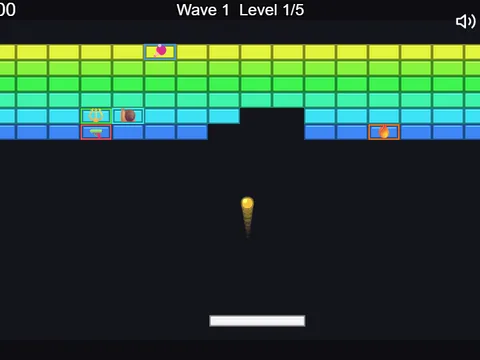
Brick Smash unblocked is a paddle-and-ball game where you can see your power-ups before you earn them. Framed bricks show an icon, and breaking one drops that exact bonus. Clear all five layouts and the run loops back with a faster ball. It loads straight from Classroom 7x's own servers, so there is nothing to install on your Chromebook.
About Brick Smash
Brick Smash started out as Brickout, one of the games Frank Force built for his open-source LittleJS Arcade collection. You get three lives and a paddle along the bottom. Every brick the ball touches breaks, and the ball rebounds from the side walls and the ceiling. The spot where it meets your paddle decides its new angle, so hits near the edges send it sideways. Normal bricks are worth 100 points, and red bricks with a dark dot take two hits.
There are five layouts: a solid wall, a pyramid, a castle whose gray walls never break, a checkerboard, and a mixed maze that changes every time. Once you clear the fifth, the wave counter rises and the ball speeds up by ten percent. Seven power-ups can fall. Three change the paddle (wide, sticky and laser), two change the ball (fireball and slow ball), and the others are multi-ball and an extra life. Breaking several bricks before the ball returns to your paddle builds a combo multiplier.
How to Play Brick Smash
- Once you press PLAY, send the ball up from your paddle with a click, a tap or the Space key.
- Slide the paddle left and right with the mouse, the arrow keys, or A and D to keep the ball in play.
- Bricks with an icon inside a colored frame are worth aiming for, because breaking one drops that power-up.
- Catch falling power-ups with your paddle, then press Space or click to fire the laser or release a stuck ball.
- Clear every breakable brick to move to the next layout. Gray bricks never break, so you can ignore them.
Brick Smash Controls
| Input | Action |
|---|---|
| Mouse / Left and Right arrows / A and D | Move the paddle |
| Space, Enter or left click | Serve the ball, let go of a caught ball or shoot the laser |
| Drag and tap (touch screens) | Move the paddle, then launch or fire |
| R | Restart the run |
| Esc | Pause |
How to Play Brick Smash on PC & Chromebook
On a laptop or Chromebook, the mouse is the quickest way to steer the paddle in Brick Smash. Slide the pointer from side to side, and a click serves the ball or shoots the laser. Keyboard players can use the arrow keys or A and D to move, with Space handling everything else. A gamepad works as well.
- Click PLAY, then click again to serve the ball.
- Move the mouse sideways, or use the arrow keys, to keep the paddle under the ball.
- Click or press Space to fire the laser once you have it.
- Press Esc to pause, or R to restart the run from the beginning.
Desktop tip: Try to catch the ball near the middle of the paddle when you want a straight shot. Edge hits are useful, but they send the ball off at sharp angles.
How to Play Brick Smash on Mobile
Brick Smash works with a finger on phones and tablets. Drag across the screen to slide the paddle left or right, and tap whenever you want to serve the ball or shoot the laser. Because the playfield stretches across the whole screen, turning your phone sideways adds room and makes the paddle easier to handle.
- Turn your phone sideways for a wider playing field.
- Tap PLAY, then tap once more to serve the ball.
- Slide your finger left and right to move the paddle under the ball.
- Tap the screen to fire the laser or release a ball stuck to the paddle.
Mobile tip: Keep your finger low on the screen while you slide. That way your hand does not cover the ball or the power-ups falling toward you.
Tips and Tricks
- Pick off framed bricks early. Their icons tell you exactly what will fall, so you can grab the power-up you need right now.
- Grab every wide paddle pickup you can. The extra width stacks with each one and stays across new layouts until a life is lost.
- Try to sneak the ball through a gap above the bricks. It bounces along the top and breaks many in a row for a big combo.
- Use the laser on dotted two-hit bricks. Each shot fires a pair of beams, so you can clear them without risking the ball.
- Use the fireball where bricks are crowded. It lasts eight seconds, and in that time the ball smashes straight through normal and two-hit bricks.
Game Info
| Game | Brick Smash |
|---|---|
| Developer | Frank Force |
| Genre | Arcade |
| Players | Single player |
| Works on | Chromebook, PC, Mac, tablet and phone |
| Price | Free, no sign-up |
| Hosting | Served from Classroom 7x's own servers |
| License | MIT (original source, license, credits) |
Brick Smash FAQ
How does the combo bonus work?
A multiplier grows with every brick broken between paddle touches, so the second brick counts double and the third triple. It drops back when the ball hits the paddle, when the sticky power catches it or when you lose a life.
What happens when I lose a life?
Losing every ball in play costs one of your three lives. It also removes active power-ups and any extra paddle width, so a dropped ball hurts more when you have built up bonuses.
Does the game save my best score?
Yes. Your best score is stored in your browser, along with your settings for sound volume and screen shake. It stays on the same device and browser unless you clear your site data.