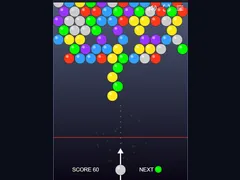
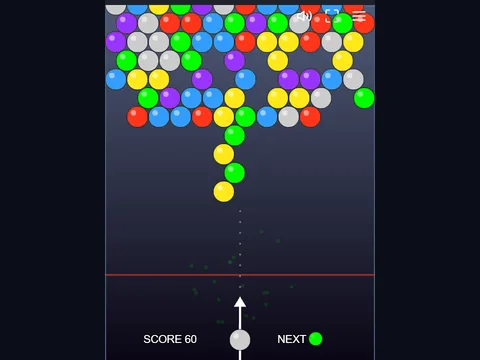
Bubble Pop Shooter unblocked is a color-matching game set in a tall, narrow well. You launch one bubble at a time upward, and three or more of the same color burst together. The game runs on Classroom 7x's own servers, so it opens in Chrome with no download and keeps your best score in the browser.
About Bubble Pop Shooter
Frank Force created this bubble-popping game for his LittleJS Arcade, an open-source set of small browser games. The board starts with bubbles in six colors hanging from the ceiling. A dotted guide line traces where your shot will travel, and it even shows bounces off the side walls. That means you never have to guess an angle. The real challenge is choosing the best target, because the field keeps sinking whether you shoot or not.
Every bubble in a popped group scores 10 points. Bubbles that were hanging from that group fall off and add 5 points each, so cutting a big cluster loose can pay off. A new row slides in about every 14 seconds. You lose if any bubble touches the red line near the shooter, and you win by clearing the whole field. The shooter only offers colors that are still in play.
How to Play Bubble Pop Shooter
- Once you hit PLAY, check the bubble sitting in the shooter and the NEXT bubble shown beside it.
- Move the mouse to swing the aiming arrow and watch the dotted guide trace the path, bounces included.
- Click to fire, and try to land next to at least two bubbles of the same color.
- Pop groups near the top to make the bubbles hanging below them drop off the board.
- Keep the lowest rows thin so nothing reaches the red line above the shooter.
Bubble Pop Shooter Controls
| Input | Action |
|---|---|
| Move the mouse | Aim the shooter |
| Left click | Fire the bubble |
| R | Restart the game |
| Esc | Pause, with restart and quit options |
| Drag your finger (touch) | Aim the shooter |
| Lift your finger (touch) | Fire the bubble |
How to Play Bubble Pop Shooter on PC & Chromebook
On a computer, Bubble Pop Shooter is a pure mouse game. The aiming arrow follows your pointer, and a single click sends the bubble on its way. Two keyboard shortcuts help as well: R restarts right away, and Esc opens a pause menu. The play area is tall, so fullscreen mode on a wide Chromebook screen gives the bubbles a little more height.
- Click PLAY to load the first field of bubbles.
- Move the mouse to aim and follow the dotted guide line.
- Left-click to fire at a group of the same color.
- Press Esc to pause or R to start a fresh game.
Desktop tip: Move the mouse slowly near the edges of your aiming range. Tiny changes there can flip a wall bounce to a completely different spot.
How to Play Bubble Pop Shooter on Mobile
Bubble Pop Shooter fits phones very well because the board is already tall and narrow. You aim by touching the screen and dragging, and the guide line follows your finger. The shot fires only when you lift, so you can adjust as long as you like before letting go. Portrait mode shows the entire field at a comfortable size.
- Hold your phone upright and tap PLAY.
- Touch the screen and drag to point the aiming arrow.
- Watch the dotted guide, then lift your finger to fire.
- Keep popping groups before the field reaches the red line.
Mobile tip: Drag with your finger low on the screen rather than over the bubbles, so your hand does not cover the guide line.
Tips and Tricks
- Glance at the NEXT bubble before every shot. If it fits a spot better, park the current bubble somewhere it will not cause trouble.
- Bank shots off the side walls to reach gaps that other bubbles block. The guide line shows exactly where a bounce will end up.
- Look for small groups that hold up big hanging clusters. Popping just three bubbles can drop a dozen more for bonus points.
- Bubbles flashing white are sitting on the red line. Clear those first, even if a bigger combo is waiting higher up.
- Shoot at a steady pace instead of waiting for a perfect match. The field drops on a timer, so slow play only helps it.
Game Info
| Game | Bubble Pop Shooter |
|---|---|
| Developer | Frank Force |
| Genre | Arcade |
| Players | Single player |
| Works on | Chromebook, PC, Mac, tablet and phone |
| Price | Free, no sign-up |
| Hosting | Served from Classroom 7x's own servers |
| License | MIT (original source, license, credits) |
Bubble Pop Shooter FAQ
How does scoring work?
You get 10 points for every bubble in a group you pop. Bubbles cut off from the ceiling drop for 5 points apiece, so bringing down a big loose cluster can earn more than the pop that freed it.
Can I get stuck with a useless color?
No. The game draws both the current bubble and the NEXT bubble only from colors already present on the field or in the incoming row, so each shot can match something.
Does Bubble Pop Shooter work on a phone?
Yes. Touch the screen and drag to aim, then lift your finger to fire. Because the board is tall and narrow, you get the biggest view of the bubbles in portrait mode.