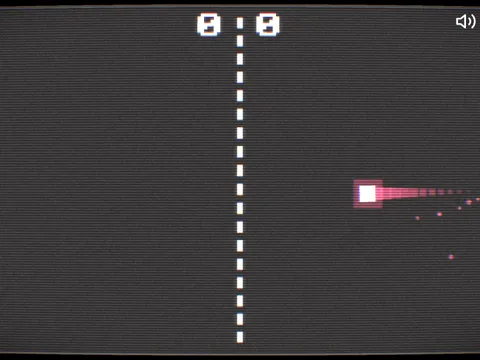
Two paddles, one glowing ball and a rally that keeps getting faster. Paddle Duel unblocked is a retro table tennis game where you face a computer opponent and try to reach 10 points first. Classroom 7x hosts it on its own servers, so it starts right away in Chrome on a Chromebook with no download and no sign-up.
About Paddle Duel
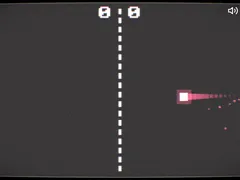
Paddle Duel is part of LittleJS Arcade, an open-source game collection by Frank Force. You control the left paddle and the computer controls the right one on a dark, glowing court. A curved old-TV screen effect, flashing colors and bursts of sparks make each hit feel lively. The top and bottom walls send the ball back into play, but a ball that gets past a paddle and out of the court gives the point to the other side. The first to reach 10 points wins the match.
Where the ball meets your paddle decides its new angle. A center hit sends it back almost flat, and an edge hit sends it off at a steep slant. Every return adds speed up to a top limit, and when a rally gets fast, the court turns red and the screen rumbles. If your paddle is moving at the moment of contact, the ball picks up spin and curves. The computer moves a bit slower than you can.
How to Play Paddle Duel
- After pressing Play, serve the ball by hitting Space, clicking the mouse or tapping the screen.
- Move your paddle up and down on the left side to meet the ball before it gets past you.
- Hit the ball near your paddle's ends to send it off at a sharp angle toward the walls.
- Keep your paddle moving as it touches the ball to add spin and make the shot curve.
- Keep scoring until one side reaches 10 points, then press again to start a new match.
Paddle Duel Controls
| Input | Action |
|---|---|
| Up / Down arrows or W / S | Move your paddle |
| Mouse | Your paddle follows the pointer up and down |
| Space / click / tap | Serve the ball |
| R | Reset the score to 0-0 |
| Esc | Open the pause menu to restart or quit |
| Drag finger (touch screens) | Slide your paddle up or down |
| Gamepad | Move your paddle with a connected controller |
How to Play Paddle Duel on PC & Chromebook
On a laptop, desktop or Chromebook, the keyboard and the mouse both steer your paddle. W and S, or the Up and Down arrows, move it in steady steps. The mouse makes the paddle track the pointer, which is better for fast reactions. Press Space to serve, R to reset the score, and Esc to open the pause menu when you need a break.
- Click Play, then press Space or click to serve.
- Move your paddle with the arrow keys, W and S, or the mouse.
- Aim with the paddle ends and keep it moving for spin.
- Press Esc to pause, restart or quit at any time.
Desktop tip: Try mouse control if the keyboard feels slow. Moving the pointer lets your paddle jump across the court faster.
How to Play Paddle Duel on Mobile
Paddle Duel has touch support, so you can play on a phone or tablet by dragging a finger up and down. The game only runs in landscape, and if you hold your phone upright, it will ask you to rotate the device. Once the screen is sideways, tap to serve and slide your finger to keep your paddle in front of the ball.
- Turn your phone or tablet sideways before you start.
- Tap Play, then tap the screen to serve.
- Slide your finger along the screen to steer your paddle up or down.
Mobile tip: Keep your finger on the screen between hits. Lifting it and touching down again wastes time in fast rallies.
Tips and Tricks
- Use the ends of your paddle on purpose. Steep wall bounces are harder for the computer to follow than flat returns.
- Swing your paddle through the ball when you hit it. The curve from spin can make the computer guess the wrong spot.
- Send the ball wide to the far side of the court. Your paddle is quicker than the computer's, so make it travel.
- Slide back toward the middle after every hit. From the center, you can reach either wall in time for the return.
- Keep your movements small when the court turns red. At top speed, short and steady moves beat wild chasing.
Game Info
| Game | Paddle Duel |
|---|---|
| Developer | Frank Force |
| Genre | Arcade, Sports |
| Players | Single player |
| Works on | Chromebook, PC, Mac, tablet and phone |
| Price | Free, no sign-up |
| Hosting | Served from Classroom 7x's own servers |
| License | MIT (original source, license, credits) |
Paddle Duel FAQ
Who serves after a point?
Whoever just lost the point gets the next serve, so the ball always moves toward them. Before launching, it rests at center court with arrow dots pointing the way, and it stays there until you press Space, click or tap.
Why does the ball keep speeding up?
Each paddle hit adds speed until the rally reaches a fixed top limit. The court tints red and the screen rumbles to warn you when it gets fast. The speed resets to normal with every new serve.
Can two people play against each other?
No. Paddle Duel is a single-player game. You always control the left paddle, and the computer controls the right one. Try beating it by a wider margin each match as you improve.