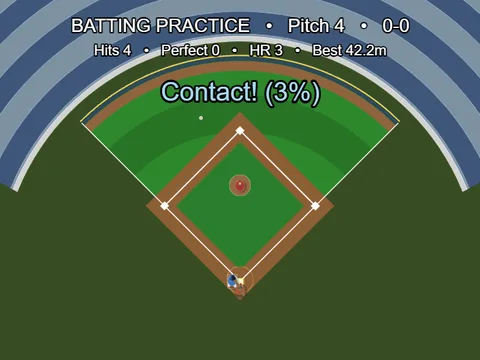
Backyard Slugger unblocked is a top-down baseball batting game that is all about timing. The pitcher keeps throwing, and you decide when to swing. Square the ball up and it can sail over the outfield wall. You can play it free on Classroom 7x, straight from the site in Chrome with no download or sign-up.
About Backyard Slugger
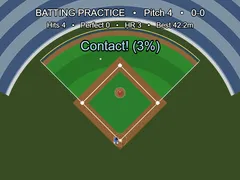
Frank Force built Backyard Slugger with the LittleJS engine and Box2D physics. You see a small ballpark from above, with your batter at home plate and the pitcher on the mound. Each pitch comes in with a slightly different speed and location. Roughly two out of three cross the yellow strike zone, and the rest miss high, low or wide. There is no inning count or game clock, so it works like an endless batting practice session.
When the bat meets the ball, a message rates your contact. Over 90 percent shows PERFECT, over 65 percent counts as a solid hit, and lower scores are plain contact. Better contact sends the ball off faster. Since the ball always travels at ninety degrees to the bat, an early or late swing pulls it toward the foul lines. A home run counts only when the hit clears the fence in fair territory between those lines.
How to Play Backyard Slugger
- Hit Play, and a moment later the pitcher releases the first pitch.
- Press Space, click or tap to swing, starting a little before the ball reaches the plate.
- Let pitches outside the yellow zone go by, since taking them adds balls instead of strikes.
- Read the contact message after each hit and adjust your timing for the next pitch.
- Press Enter to call the next pitch sooner, or R to reset your session stats.
Backyard Slugger Controls
| Input | Action |
|---|---|
| Space or left click | Swing the bat |
| Enter | Call the next pitch right away |
| R | Reset your session stats |
| Esc or menu icon | Pause, restart or quit |
| Tap the screen (touch) | Swing the bat |
How to Play Backyard Slugger on PC & Chromebook
Backyard Slugger is a great fit for a Chromebook or laptop, where the wide ballpark fills the screen nicely. You only need one key to play, since Space swings the bat. A left click does the same thing if you prefer the mouse. Enter calls the next pitch without the usual pause, R clears your session stats, and Esc brings up the pause menu.
- Press Play and wait for the pitcher to throw.
- Press Space or left-click to swing as the ball nears the plate.
- Watch the contact rating and where the ball lands.
- Use Enter for a faster next pitch, and Esc to pause.
Desktop tip: Keep your eyes on the ball, not the batter. Timing gets easier once you react to where the ball is rather than to the pitcher.
How to Play Backyard Slugger on Mobile
Backyard Slugger can be played on a touchscreen, since tapping anywhere swings the bat. The catch is the layout. The ballpark is made for wide screens, so when a phone is held upright, the foul lines and outfield edges get cut off. Turn your phone sideways for a proper view. Keyboard shortcuts, like Enter for a quick pitch, are not available on touch.
- Turn your phone or tablet sideways before you tap Play.
- Tap anywhere on the screen to swing at the pitch.
- Use the menu icon at the top right to pause or restart.
- Watch the contact message to fine-tune your tap timing.
Mobile tip: Hover your finger just above the screen between pitches. Lifting your whole hand away adds a delay that makes your swings late.
Tips and Tricks
- Your bat needs roughly a quarter of a second to swing through. Start it while the ball still has a few steps to travel before home plate.
- If a hit curls foul past the left line, you swung early, so wait slightly longer next time. Foul to the right means swing sooner.
- The best contact comes toward the far end of the bat, right on its center line. Hitting there earns the top rating and the fastest ball.
- Do not chase wild pitches. Holding still on a ball outside the zone costs you nothing and keeps your count healthy.
- Use Enter to skip the pause between throws. A quicker rhythm helps you lock in your timing once you find it.
Game Info
| Game | Backyard Slugger |
|---|---|
| Developer | Frank Force |
| Genre | Sports |
| Players | Single player |
| Works on | Chromebook, PC and Mac (touch screens work, mouse is more precise) |
| Price | Free, no sign-up |
| Hosting | Served from Classroom 7x's own servers |
| License | MIT (original source, license, credits) |
Backyard Slugger FAQ
Why do some hits go foul?
Your timing decides the direction, because the ball always leaves perpendicular to the bat barrel. Swing early or late and it lands outside the white foul lines. Only fair balls that clear the fence count as home runs.
How do strikes and balls work?
A swing and a miss is a strike, as is a pitch you let go by inside the yellow zone. Taking a pitch outside the zone gives you a ball. The count resets after three strikes, four balls or any hit.
Does Backyard Slugger ever end?
No. There is no final out and no time limit, so you can keep swinging for as long as you like. Press R whenever you want to wipe your session stats and start counting again.