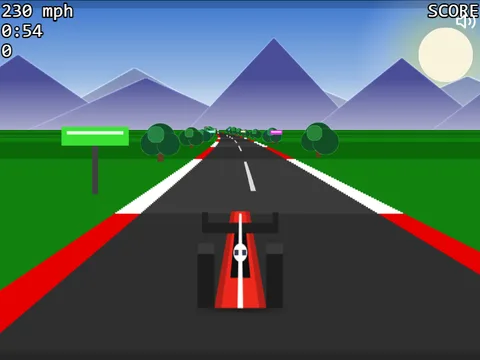
Sixty seconds, one red car and a track full of slower traffic. Speedway Sprint unblocked is a short arcade racer where every second on the clock turns into points. Classroom 7x serves it straight from its own servers, so you can play it in Chrome on a Chromebook without downloading anything or creating an account.
About Speedway Sprint
Speedway Sprint belongs to LittleJS Arcade, an open-source collection by Frank Force. The camera sits right behind your car, and in a classic pseudo-3D style the road bends and scrolls toward you. With each bend, the mountains and sun drift across the sky. Every car, tree and sign is drawn in code, and the sound effects are created as you play. What you get is a light racer that starts quickly and stays simple.
Your score grows with distance, so the faster you go, the quicker the number climbs. The car can reach 230 mph, but twelve rival cars circle the track at lower speeds. Bump one from behind and you lose close to half your speed. Drift onto the grass and you slow down while earning points at a reduced rate. The clock only ticks while you are moving. When it hits zero, a Time Up screen shows your result.
How to Play Speedway Sprint
- From the title screen, hit Play, then hold the gas to get your car moving from a standstill.
- Steer left and right to stay on the asphalt, turning into each curve a little before it arrives.
- Pass rival cars through the widest gap you can find, since a rear bump costs a lot of speed.
- Use the brake only when you must avoid a crash, then get straight back on the gas.
- When the timer runs out, check your score and press Enter, Space or click to race again.
Speedway Sprint Controls
| Input | Action |
|---|---|
| Up arrow / W | Accelerate |
| Down arrow / S | Brake |
| Left / Right arrows or A / D | Steer |
| Mouse | Hold left button to accelerate, right button to brake, move pointer to steer |
| Esc | Open the pause menu |
| Enter / Space or click | Start a new run after time is up |
| Touch stick and buttons | Left stick steers, right buttons for gas and brake |
| Gamepad | Left stick steers, A or right trigger accelerates, B brakes |
How to Play Speedway Sprint on PC & Chromebook
Speedway Sprint gives you several ways to drive on a computer. Most players like the arrow keys or W, A, S and D, but you can also hold mouse buttons for gas and brake while the pointer steers. A plugged-in controller works as well. Click the game once after it loads so your key presses reach the car instead of scrolling the page.
- Click Play on the title screen, then hold Up or W to accelerate.
- Steer with A and D or the Left and Right arrow keys, and start every turn early.
- Tap Down or S to brake only when you need to avoid a car ahead.
- Press Esc to pause, restart or quit, and Enter or Space to race again after Time Up.
Desktop tip: Choose keyboard or mouse steering before you start. Switching between them mid-run can make the car jerk to one side.
How to Play Speedway Sprint on Mobile
Speedway Sprint comes with its own touch layout. On a phone or tablet, you steer with an analog stick that shows up on the left side of the screen, while two round buttons on the right control the gas and brake. Turn your device sideways to see the most road ahead, which makes curves and slower cars much easier to spot in time.
- Turn your phone or tablet sideways before you press Play.
- Hold the lower button on the right to accelerate and the upper one to brake.
- Push the stick on the left gently to steer, easing off as the road straightens.
- Whenever you need a break, pause with the menu icon up in the top corner.
Mobile tip: Keep your thumb resting on the stick instead of lifting it. Small, steady pushes keep the car on the asphalt.
Tips and Tricks
- Begin turning before a bend starts. After you release the key the car slides a little longer, and curves push you to the outside.
- If you end up on the grass, keep holding the gas. Letting go there makes the car roll to a stop.
- Rival cars wobble a little inside their lane, so give them extra room when passing instead of squeezing by.
- Use the long straight after the S-bends to climb back to full speed after a bump or a trip onto the grass.
- Pick one way to steer on a computer. The mouse takes control as soon as you move it, and an arrow key press gives control back to the keys.
Game Info
| Game | Speedway Sprint |
|---|---|
| Developer | Frank Force |
| Genre | Racing |
| Players | Single player |
| Works on | Chromebook, PC, Mac, tablet and phone |
| Price | Free, no sign-up |
| Hosting | Served from Classroom 7x's own servers |
| License | MIT (original source, license, credits) |
Speedway Sprint FAQ
Does finishing a lap give me more time?
No. Each run lasts one minute, and the lap counter only shows how far you have traveled. The timer pauses while your car is stopped, but you also earn nothing while standing still.
What happens when I hit another car?
Your car flashes white, drops nearly half its speed and is shoved to the side. Since the run does not end, steer around that car and get back up to speed as quickly as you can.
Can I use a game controller?
Yes, a gamepad works. The left stick steers, the A button or the right trigger accelerates, and the B button brakes. Keyboard, mouse and touch controls also work, so you can pick whichever feels best.