Hue Jumper unblocked is a fast 3D driving game where the clock is your only rival. A fresh road unrolls over the hills each run, and checkpoints keep your timer alive. Steer with the mouse, hold to brake and double-click to jump. It runs on Classroom 7x in Chrome, straight from the site with nothing to install.
About Hue Jumper
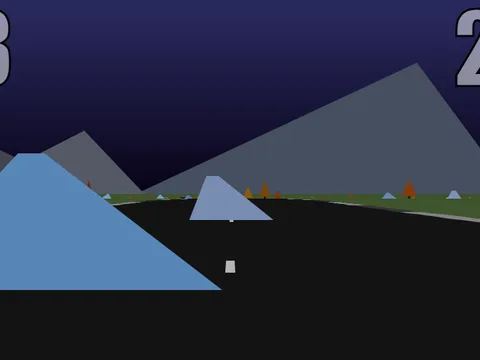
Frank Force originally created Hue Jumper as a tiny game that fit in only 2 kilobytes, and this is his larger, readable version of it. Simple low-poly shapes make up the world, and the road is randomly generated on each run. The car gains speed by itself while its wheels touch the ground, as long as you are not braking. Rocks and trees line the route, and hitting one costs you most of your speed.
The timer starts at 20 seconds. Every 100 units on the distance counter there is a checkpoint, which adds 10 seconds, though the clock can never hold more than 20. Each checkpoint also changes the color of the whole world, which is where the name comes from. The road starts wide and easy, then grows narrower and twistier. A run ends when time hits zero, and reaching the finish at 1000 is the real goal.
How to Play Hue Jumper
- Click the game screen to capture the mouse and start the 20 second timer.
- Move the mouse left or right to steer, and ease it back toward the center to straighten out.
- Hold the mouse button to brake before sharp bends, then let go to speed back up.
- Double-click while your wheels are on the road to jump over rocks and trees.
- Cross each checkpoint for 10 more seconds, and press R whenever you want a fresh road.
Hue Jumper Controls
| Input | Action |
|---|---|
| Move the mouse left or right | Steer |
| Hold the mouse button | Brake |
| Double-click | Jump |
| Click the game screen | Start driving and capture the mouse |
| R | Restart on a new road |
| 1 | Save a screenshot |
| Hold a finger on one side (touch) | Steer toward that side |
| Lift your finger (touch) | Brake |
| Quick tap (touch) | Jump |
How to Play Hue Jumper on PC & Chromebook
Hue Jumper is made for a mouse, so a Chromebook or laptop with a real mouse is the best setup. Clicking the game captures your cursor, and from then on side-to-side mouse moves steer the car. Holding the button brakes, and a double-click jumps. A trackpad can work, but steering is much smoother with a mouse. R gives you a fresh road at any time.
- Click the game screen to capture the mouse and start the clock.
- Slide the mouse left or right to steer.
- Hold the button to brake and double-click to jump.
- Press R to restart on a brand new road.
Desktop tip: Pressing Esc or clicking outside the game releases the cursor, and the car brakes. Click the game again to keep driving.
How to Play Hue Jumper on Mobile
Hue Jumper has basic touch controls, so you can drive on a tablet or phone. You steer by holding a finger on one side of the screen, brake by lifting it and jump with a quick tap. There is one catch. The game has no on-screen restart button, so starting a new road on a touch device means reloading the page.
- Turn your device sideways and touch the screen to start.
- To steer, press and hold a finger on the side of the screen you want to turn toward.
- Lift your finger to brake, and tap quickly to jump.
- Reload the page when you want a new road.
Mobile tip: Keep your finger down as much as you can. Lifting it brakes the car, so taking it off between turns slows you down.
Tips and Tricks
- Steering stays where you leave it, so after each curve, move the mouse back toward the middle or the car will keep turning.
- Brake as little as possible. Every second spent slowing down comes off a clock that holds 20 seconds at most.
- Jump just before an obstacle while you are still on the road. The double-click does nothing once your wheels leave the ground.
- Watch the horizon instead of your car. Hills hide the road ahead, and spotting a turn early keeps you on the asphalt.
- If a new road starts with nasty bends, press R. Every run builds a fresh layout, so a better one is a single key away.
Game Info
| Game | Hue Jumper |
|---|---|
| Developer | Frank Force |
| Genre | Racing |
| Players | Single player |
| Works on | Chromebook, PC and Mac (touch screens work, mouse is more precise) |
| Price | Free, no sign-up |
| Hosting | Served from Classroom 7x's own servers |
| License | GPL-3.0 (original source, license, credits) |
Hue Jumper FAQ
Why did my car stop?
One of two things happened. The timer may have reached zero, which ends the run, or the game may have lost hold of your mouse cursor. A free cursor makes the car brake automatically. Click the game again to capture the mouse and keep going.
How do checkpoints work?
Each checkpoint is marked by a bright band stretched across the road, placed every 100 units on the distance counter. Driving through one adds 10 seconds, but the clock tops out at 20, so extra time cannot be banked for later.
Does the road ever end?
Yes. Each road is built to finish at 1000 on the distance counter. It gets narrower and curvier as you get closer, so making it all the way to the end is the true goal of every run.