Red Rock Descent unblocked is a 3D downhill race that starts at the top of a coastal mountain and ends at a finish line far below. Three computer cars share the road, and your job is to beat all of them. Classroom 7x hosts the game on its own servers, so it runs right in Chrome without any download.
About Red Rock Descent
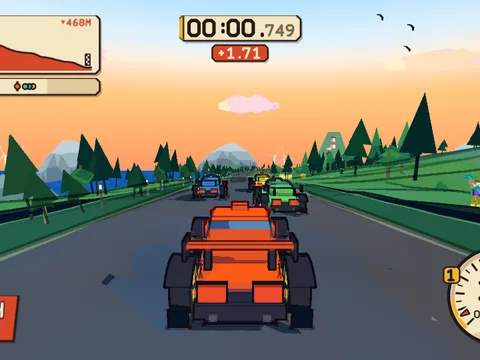
StarKnightt created this racer, originally named redrock, as an open-source project. Nothing in it is loaded from image or sound files: the code generates the cars, trees, audio and lettering at startup. Bold black edges and solid stripes of color give every scene the feel of a comic book page. The stage covers 5.6 km and drops 468 meters, and along the way the road passes forests, wind turbines, the sea and crowds of cheering fans.
You start at the back of the pack, so passing cars is part of the plan. The road has ramps that launch your car into the air, and the loose edges have less grip than the tarmac. A card in the top left shows your spot on the elevation profile and a strip of rival positions. Under the timer, a number shows your gap in seconds to the car ahead. At the bottom, a results card lists every driver's time.
How to Play Red Rock Descent
- Press Enter on the title screen, then wait through the short countdown or press Enter again to skip it.
- Hold the Up arrow or W to speed up, and press the Down arrow or S to brake.
- Use A and D or the left and right arrow keys to steer, and tap Space for a quick handbrake turn.
- Watch the gap number under the timer to see how far you are behind the car ahead.
- Press R if your car gets stuck off the road, or Escape to open the pause menu.
Red Rock Descent Controls
| Input | Action |
|---|---|
| Up arrow / W | Accelerate |
| Down arrow / S | Brake |
| Left / Right arrows or A / D | Steer |
| Space | Handbrake |
| Hold C | Look behind |
| Enter | Start the race or skip the countdown |
| R | Restart or recover a stuck car |
| Escape | Open the pause menu |
| On-screen pedals, tilt or thumb drag (touch) | Throttle, brake and steer on phones and tablets |
How to Play Red Rock Descent on PC & Chromebook
Red Rock Descent was built for a keyboard, and that is the smoothest way to race on a laptop or Chromebook. The arrow keys or W A S D handle throttle, brake and steering, while Space gives you a handbrake. The game also supports a gamepad if you have one connected. Because it is a 3D game, closing other busy tabs can help it run smoothly.
- Click the game once, then press Enter on the title screen to start.
- Hold Up or W to accelerate and Down or S to brake before turns.
- Steer with Left and Right or A and D, adding a tap of Space on hairpins.
- Press Escape to pause, or R to restart if you get stuck.
Desktop tip: Keep your fingers on W A S D with your thumb resting on Space. That layout lets you brake, steer and use the handbrake without moving your hand.
How to Play Red Rock Descent on Mobile
Red Rock Descent can be played on a phone or tablet, but it works best on a computer. On touch screens, two on-screen pedals handle throttle and brake. Steering comes from tilting the device, or you can slide a thumb left and right. The 3D graphics take a lot of power, so older phones may stutter. A Chromebook or laptop usually gives a smoother race.
- Turn your device sideways before the race begins.
- Hold the on-screen throttle pedal to drive and the brake pedal to slow down.
- Steer through the bends by tilting your phone or sliding your thumb left and right.
Mobile tip: Hold the device steady with both hands and make small tilts. Big swings send the car off the tarmac, where it loses grip.
Tips and Tricks
- Brake on the straight before a bend, then ease off as you turn in. Braking in the middle of a corner shifts the car's weight and makes it slide.
- Keep all four wheels on the tarmac. The loose edge has about a quarter less grip, so running wide costs you the next corner too.
- Tap Space briefly for tight hairpins. Holding the handbrake too long scrubs off the speed you need for the following straight.
- Do not panic about starting last. The stage is long, so pass the cars one at a time instead of forcing a risky move early.
- Glance at the gap number after each section. If it shrinks, your lines are working, and if it grows, try braking a little earlier.
Game Info
| Game | Red Rock Descent |
|---|---|
| Developer | StarKnightt |
| Genre | Racing |
| Players | Single player |
| Works on | Chromebook, PC and Mac (touch screens work, mouse is more precise) |
| Price | Free, no sign-up |
| Hosting | Served from Classroom 7x's own servers |
| License | ISC (original source, license, credits) |
Red Rock Descent FAQ
Why is the clock not running at the start?
The timer only starts once the countdown lights go out. All the cars sit still while three, two, one counts down. If you have watched that countdown before, pressing Enter skips it.
What should I do if my car gets stuck?
Press R. Besides starting the run over, it saves a car that has slid off the road and is stuck. Another option is to press Escape and choose Restart from the pause menu.
Will it run on a phone or tablet?
Yes. On a touch screen you get pedals for throttle and brake, and you steer by tilting or by dragging with your thumb. Rotate to landscape before you start. Older devices may run slowly, because the 3D scene needs a lot of power.