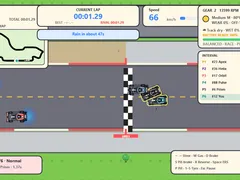
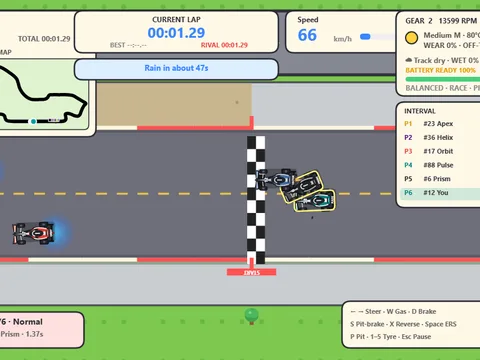
A whole race weekend fits into a few minutes in Mini Grand Prix unblocked. You choose a circuit by spinning a globe, set one fast lap to earn your grid spot, and then race five rival teams. Tyres wear out, rain can roll in, and a pit stop is required. Classroom 7x serves the game from its own servers, so it opens in Chrome.
About Mini Grand Prix
Mini Grand Prix was created by hexinhao and shared as open-source code. It is a top-down open-wheel racer with cars and tracks drawn in code. The season lists 24 venues, and you can pick one from the list or click it on the globe. Before a weekend, you choose one of six fictional teams, the AI difficulty, the weather and your starting tyre. A solo Time Trial mode lets you pick how many laps to run.
A weekend starts with qualifying, where you set one timed lap alone. Your time decides your place on the grid for a three-lap race. Running wide onto kerbs, runoff or gravel slows you down, and causing contact or cutting the track adds penalties. You must change tyres at least once during the race. Points, standings, best laps and unlockable color schemes are saved in your browser, and a Garage lets you tune your car.
How to Play Mini Grand Prix
- Pick a circuit from the season list or the globe, then choose Grand Prix Weekend.
- Set your team, AI level, weather and starting tyre on the setup screen.
- Drive one clean qualifying lap, steering with the arrows, accelerating with W and braking with D.
- Wait for all five red lights to go out before pressing W at the race start.
- Press P to call for a pit stop. Once you pull into your box, pick new tyres with keys 1 to 5.
Mini Grand Prix Controls
| Input | Action |
|---|---|
| Left / Right arrows | Steer |
| W | Accelerate |
| D | Brake |
| S | Emergency brake (pit lane only) |
| X | Reverse |
| Space | Use the battery boost |
| P, then 1 to 5 | Request a pit stop, then pick Soft, Medium, Hard, Intermediate or Wet tyres |
| Escape / R | Pause or return to the menu / restart after a session |
| Mouse | Click menus and drag the globe to pick a circuit |
How to Play Mini Grand Prix on PC & Chromebook
Mini Grand Prix is built for a keyboard, so a Chromebook or laptop is the right fit. The controls are a little unusual: you steer with the arrow keys, but W accelerates and D brakes, with your left hand doing the pedals. Space fires the battery boost and P calls for a pit stop. Use the mouse or touchpad to click through menus and spin the globe.
- Open the game and click a circuit on the list or globe.
- Choose Grand Prix Weekend and set your team and options.
- Steer with the arrow keys, accelerate with W and brake with D.
- Press P to pit, then pick tyres with the number keys 1 to 5.
Desktop tip: Try a Time Trial first. It gives you a quiet track to learn the W and D pedal keys before racing other cars.
How to Play Mini Grand Prix on Mobile
Mini Grand Prix cannot be driven on a phone or tablet screen. It needs a physical keyboard for steering, speed and pit stops, and there are no on-screen controls. A school Chromebook or a laptop handles it nicely, so this is a good one to save for later. Your season progress lives in the browser of the device you play on.
- Move to a Chromebook, laptop or desktop with a keyboard.
- Open Classroom 7x in Chrome and find Mini Grand Prix.
- Start with a Time Trial to learn the controls before a full weekend.
Mobile tip: Play on the same computer each time if you want to keep building one season, since standings are saved per browser.
Tips and Tricks
- Get used to braking with D, not S. The S key only works in the pit lane, so pressing it on track will not slow you down.
- Plan your braking early. The car keeps its speed when you lift off W, so only the brake, reversing or running wide will slow it.
- Watch for weather messages on screen. A rain warning gives you time to pit for Intermediate or Wet tyres before the track gets slippery.
- Charge the battery with steady, moderate braking, then fire the boost with Space on a long straight where the extra push helps most.
- Do not skip your pit stop. Finishing without one adds twenty seconds to your time, which can drop you several places.
Game Info
| Game | Mini Grand Prix |
|---|---|
| Developer | hexinhao (xhhdaxx) |
| Genre | Racing |
| Players | Single player |
| Works on | Chromebook, PC and Mac (keyboard required) |
| Price | Free, no sign-up |
| Hosting | Served from Classroom 7x's own servers |
| License | MIT (original source, license, credits) |
Mini Grand Prix FAQ
Why was time added to my race at the start?
You pressed W before all five red lights went out. That is a jump start, and the penalty for it is five extra seconds. Keep your finger off the key until the lights clear.
Which tyre should I choose?
Soft tyres are fastest but fade the quickest. Hard tyres last longer with a lower top speed, and Medium sits in between. Switch to Intermediate or Wet tyres when rain starts falling.
Can I change how my car handles?
Yes. The Garage offers four car types and a performance budget you can share out across steering, braking, acceleration, energy recovery and top speed. Try different setups on the circuits you race most.