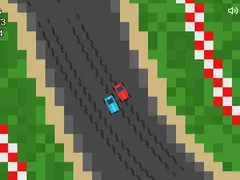

Tiny Track Racer unblocked puts you behind the wheel of a little red car on a twisting circuit seen from above. Every race uses a brand-new layout, so memorizing the corners never works for very long. The game runs on Classroom 7x's own servers, which means no download and no sign-up before the countdown starts.
About Tiny Track Racer
Originally named Micro Racer, this game is one Frank Force built for his open-source LittleJS Arcade collection. Everything you see, from the cars to the grass and sand, is drawn by code instead of image files. Four cars line up at the start: your red one and three driven by the computer. The camera stays above you and leans ahead as your speed climbs, which gives you more warning about the next bend. The goal is simple: finish three laps before your rivals do.
The track shape changes every time you restart. Gray asphalt is the fast surface, the pale edges slow you a little, and the sand and grass beyond them slow you a lot. A striped wall surrounds the course and knocks you back if you clip it. Spinning squares on the road are boost pads that give a quick burst of speed, but each one disappears for a few seconds after any car uses it. Your fastest finish is saved in your browser.
How to Play Tiny Track Racer
- Hit Play, then hold off on the gas until the three, two, one countdown ends.
- Hold the Up arrow or W to speed up, and steer with Left and Right or A and D.
- Keep your wheels on the gray asphalt, since sand and grass cut your speed sharply.
- Drive over the spinning boost pads to get a short burst of extra speed.
- Cross the finish line three times, then check your place and time on the results screen.
Tiny Track Racer Controls
| Input | Action |
|---|---|
| Up arrow / W | Accelerate |
| Down arrow / S | Brake and reverse |
| Left / Right arrows or A / D | Steer |
| Hold Space | Handbrake drift |
| N (during a race) / R (after the finish) | Restart on a new track |
| Esc | Open the pause menu |
| On-screen stick (touch) | Steer, or push up to accelerate and down to brake |
| Right-side buttons (touch) | Lower button accelerates, upper button brakes |
| Menu icon (touch) | Pause or restart |
How to Play Tiny Track Racer on PC & Chromebook
On a Chromebook or laptop, Tiny Track Racer plays best with the keyboard. The arrow keys and W, A, S, D both work, so choose whichever feels comfortable. Space adds a handbrake for sliding through tight turns. If you have a game controller plugged in, the game can read that too. Click the game once after it loads so your key presses reach the car.
- Click Play, then click inside the game so it receives your keys.
- Hold Up or W to accelerate and steer with Left and Right or A and D.
- Hold Space in hairpin turns to slide the back of the car around.
- Press N mid-race for a new track, or Esc to open the pause menu.
Desktop tip: Keep one finger resting on Down or S. A quick brake tap before a corner usually beats a long slide into the sand.
How to Play Tiny Track Racer on Mobile
Tiny Track Racer works on phones and tablets with on-screen controls. A thumbstick sits on the left side for steering, and two buttons on the right handle the gas and the brake. The layout fits a wide screen best, so turning your device sideways gives you more room to see the track ahead and keeps your thumbs apart.
- Turn your device sideways and tap Play.
- Push the left stick to steer, or push it up to accelerate.
- Hold the lower right button for gas and the upper right button to brake.
- Open the menu with the icon in the top corner to pause or restart on a new track.
Mobile tip: There is no handbrake on touch, so brake a little earlier than you would on a keyboard to keep tight corners under control.
Tips and Tricks
- Lift off the gas for a split second before a sharp bend. Your car turns tightly at lower speed and stays out of the sand.
- Save the Space handbrake for hairpins. A short hold swings the back of the car around, then let go so your grip returns on the exit.
- Boost pads alternate sides of the road, so drift toward the next one early instead of jerking the wheel at the last moment.
- Make your passes on long straights. The computer cars ease off for tight turns, which opens room on the stretch that follows.
- If you get pinned against the wall, reverse with Down or S, aim back down the road and accelerate again instead of grinding along it.
Game Info
| Game | Tiny Track Racer |
|---|---|
| Developer | Frank Force |
| Genre | Racing |
| Players | Single player |
| Works on | Chromebook, PC, Mac, tablet and phone |
| Price | Free, no sign-up |
| Hosting | Served from Classroom 7x's own servers |
| License | MIT (original source, license, credits) |
Tiny Track Racer FAQ
Is the track the same every time?
No. Each race builds a fresh closed loop, so the corners change whenever you restart. For a new layout, press N while racing or R once you finish, then try for a better time.
Can I race on a tablet or phone?
Yes. You steer with a touch stick on the left side of the screen, while two buttons on the right control gas and brake. The handbrake drift needs a keyboard or controller, but you can still win without it.
Does the game remember my best time?
Yes. Your quickest finish shows on the title screen and is stored in your browser. Playing in a different browser or clearing your site data will start your record over.