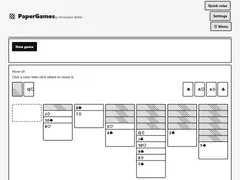

A deck of cards, seven columns and a bit of patience are all Klondike Solitaire unblocked asks for. You free buried cards, sort them by color and rank, and send each suit home. The game runs straight from Classroom 7x in your browser, with nothing to install and no account, so a quick round fits into a short break.
About Klondike Solitaire
This version comes from the open-source PaperGames collection by Christopher Müller. It uses the friendly draw-one rule: each tap on the stock flips a single card onto the waste pile. When the stock runs dry, another tap turns the waste back over in the same order, and there is no limit on how many times you can cycle through. There is no timer or point score, just a move counter, so you can play at your own pace.
The look is plain on purpose. Cards were designed to stay clear on black-and-white screens, so red suits appear as hollow outlines and black suits are solid. You select a card and then choose where it goes, which means no dragging is needed. Settings let you pick from three text sizes, switch on high contrast, and change card spacing. Your current deal stays saved in the browser, although the undo list resets after a reload.
How to Play Klondike Solitaire
- Start with the seven columns: only the top card of each is face up, and the rest wait underneath.
- A face-up card can go on a card of the opposite color that is one rank higher, like a red 9 on a black 10.
- Select the top card of a neat run to carry the whole run to another column in one move.
- Tap the stock to flip one card onto the waste, and play it if it fits somewhere.
- Fill an empty column only with a King, and send Aces and the cards above them to the four foundations.
- Win the game by moving all 52 cards onto the foundations, one suit per pile.
Klondike Solitaire Controls
| Input | Action |
|---|---|
| Click a card | Pick up that card or the face-up run below it |
| Click a column or foundation | Place the selected cards there |
| Click the stock | Draw one card, or turn the waste back over |
| Tab, then Enter or Space | Select and place cards with the keyboard |
| Undo / New game buttons | Take back moves or deal again (New game may be inside Menu) |
| Tap (touch screens) | Tap a card, then tap where it should go |
How to Play Klondike Solitaire on PC & Chromebook
Klondike Solitaire works well with a mouse or touchpad on a Chromebook or laptop. Instead of dragging, you click a card and then click where you want it to land, which is easier on a small trackpad. If you prefer the keyboard, Tab moves between cards and piles, and Enter or Space selects them. The Menu button holds New game when the window is narrow.
- Open the game and read the short rules card if it appears.
- Click a face-up card, then click the column or foundation where it belongs.
- Click the stock pile to flip one new card when you run out of moves.
- Use Undo to step back, or open Menu and choose New game for a fresh deal.
Desktop tip: If the cards feel small on your screen, open the settings and raise the text size or try a different spacing level.
How to Play Klondike Solitaire on Mobile
Because this game uses tap-then-tap moves, it is comfortable on phones and tablets. You never need to drag a card with your finger, which avoids slips on small screens. Tap the card first, then tap the pile where it should go. The layout works in portrait or landscape, and your deal is saved in the browser if you need to switch apps.
- Open Klondike Solitaire and turn your device whichever way feels best.
- Tap a card to select it, then tap its new column or foundation.
- Tap the stock to draw, and tap Undo if a move was a mistake.
Mobile tip: On a small phone, turn on the larger text size in settings so ranks and suits are easier to read at a glance.
Tips and Tricks
- Focus on the right-hand columns early. The sixth and seventh columns hide the most face-down cards, so freeing them opens up the game fastest.
- Leave an empty column open until a King is ready to move in. An empty spot that sits unused does nothing for you.
- Do not rush every low card to the foundations. A black 5 left on the board may be the only home for a red 4 later.
- Pay attention as you cycle the stock. The order never changes between passes, so you can remember when a card you need is coming.
- Try a risky move and press Undo if it goes nowhere. Undo has many steps, so experimenting costs you nothing during a session.
Game Info
| Game | Klondike Solitaire |
|---|---|
| Developer | Christopher Müller |
| Genre | Card & Board |
| Players | Single player |
| Works on | Chromebook, PC, Mac, tablet and phone |
| Price | Free, no sign-up |
| Hosting | Served from Classroom 7x's own servers |
| License | MIT (original source, license, credits) |
Klondike Solitaire FAQ
How many cards flip over when I tap the stock?
Just one. This is the draw-one style of Klondike, which is the gentler of the two common versions. You can also go through the stock as many times as you like, so a card is never lost for good.
Why do hearts and diamonds look empty?
The cards were drawn to work on black-and-white screens. Red suits use outlined symbols and black suits use filled ones. Treat the hollow symbols as red when you build alternating columns.
Is there a score or a timer?
No. The game only counts your moves, so there is no pressure to hurry. If you like a challenge, try to clear a deal in fewer moves than your last win.