Two colors, seven columns and one goal: get four of your discs in a straight line first. Four in a Row unblocked lets you test that plan against a computer opponent or a friend sitting next to you. Classroom 7x runs it right in the browser, so you can start a match on a Chromebook without installing anything.
About Four in a Row
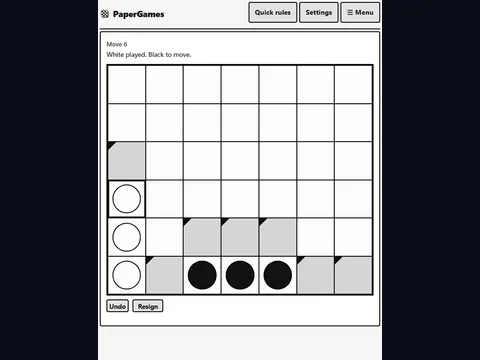
This game is part of PaperGames, an open-source collection by Christopher Müller. The board stands upright with seven columns and six rows, for 42 slots in total. Players drop black and white discs, and each one falls to the lowest open space in its column. A line of four can run across, straight up, or along either diagonal. When every slot is filled and nobody has connected four, the round is a draw.
You can play two ways. In 2 Player mode, two people share one screen and take turns. Against the computer, you choose your disc color and one of three levels. Easy plays at random, Medium looks one move ahead with a little randomness, and Hard searches many moves deep. Black always goes first. Undo, Resign, a text size option and high contrast are included, and your browser keeps an unfinished game so you can come back to it.
How to Play Four in a Row
- Pick 2 Player for a friend, or vs Computer to choose your color and a difficulty level.
- Press New game, then click or tap any cell in a column to drop your disc there.
- Watch your disc fall to the lowest empty slot, stacking on top of any discs below it.
- Line up four of your discs across, up and down, or on a diagonal to win the round.
- Block your opponent whenever they have three in a line with an open space to finish it.
Four in a Row Controls
| Input | Action |
|---|---|
| Click a column | Drop your disc into that column |
| Arrow keys + Enter | Choose a column and drop with the keyboard |
| Undo button | Take back your last move (and the computer's reply) |
| Resign button | Give up the current round |
| New game button | Start a fresh round with your chosen settings |
| Tap a column (touch screens) | Drop a disc on a phone or tablet |
How to Play Four in a Row on PC & Chromebook
On a Chromebook or laptop, Four in a Row is mostly a clicking game. Click anywhere in a column and your disc drops into it, so there is no need to aim for the top. You can also use the arrow keys to move between columns and press Enter to drop. The settings let you raise the text size or turn on high contrast if the board is hard to read.
- Open the game and choose 2 Player or vs Computer.
- Against the computer, pick your color and level, then click New game.
- Click a column, or use the arrow keys and Enter, to drop a disc.
- Use Undo to rethink a move, or Resign to end the round early.
Desktop tip: When you play a friend on one laptop, sit side by side and let the person whose turn it is hold the touchpad.
How to Play Four in a Row on Mobile
Four in a Row works smoothly on phones and tablets. Tap any cell in a column and your disc falls into place, so big fingers are no problem. The tall board suits a phone held upright. It also makes a good pass-and-play game, since two people can share one device and simply hand it over after each turn.
- Open the game and tap 2 Player or vs Computer.
- Choose your settings and tap New game to begin.
- Tap a column to drop your disc, then wait for the reply.
- Tap Undo or Resign at any time from the buttons below the board.
Mobile tip: In pass-and-play, glance at the status line before you tap so you never drop a disc during your friend's turn.
Tips and Tricks
- Claim the center column early. More possible lines of four pass through it than through any edge column.
- Try to set up two winning spots at the same time. Your opponent can only block one of them per turn.
- Before dropping a disc, check the slot directly above it. Filling the cell under an enemy threat gives them the winning space.
- Scan the diagonals after every move. Slanted lines are the easiest to overlook for you and for a friend across the table.
- Practice against Medium before trying Hard. Hard rarely misses a threat, so you need solid blocking habits to beat it.
Game Info
| Game | Four in a Row |
|---|---|
| Developer | Christopher Müller |
| Genre | Card & Board, 2 Player |
| Players | 1 or 2 players |
| Works on | Chromebook, PC, Mac, tablet and phone |
| Price | Free, no sign-up |
| Hosting | Served from Classroom 7x's own servers |
| License | MIT (original source, license, credits) |
Four in a Row FAQ
Can I play Four in a Row with a friend?
Yes. Choose 2 Player mode and pass the device back and forth. Black moves first, and a status line at the top shows whose turn it is, so nobody loses track during a close game.
How do I let the computer go first?
In vs Computer mode, pick white as your color before pressing New game. Black always starts, so the computer will open the round and you will reply.
Where will my disc land?
It drops to the lowest open slot in the column you choose. To help you plan, a shaded cell with a small mark in its corner shows where each column's next disc would land.