Dominoes unblocked puts the classic tile game in your browser, using a double-six set that holds 28 tiles. You match numbers at the open ends of the line and race to lay down your final tile first. Classroom 7x runs it in Chrome without an account, and you can face the computer or share one screen with friends.
About Dominoes
Christopher Müller made this game for his open-source PaperGames collection, where its name is just Domino. Two to four players can sit at the table. Any seat can be filled by a computer opponent, or you can pass one device around the room so everyone plays. With two players, each person gets seven tiles. With three or four, each gets five. Leftover tiles stay face down in the stock for drawing later.
Whoever holds the highest double leads the round, and the game sorts this out automatically. When nobody has a double, the round opens with the tile carrying the most pips. If no tile in your hand fits, you draw from the stock, and you pass once the stock runs out. A round where every player passes is blocked, and the lowest pip total wins it. A Triangles variant is also included, with 56 three-sided tiles matched at their corners.
How to Play Dominoes
- Choose a mode, the number of players, the variant and the computer level, then start a new game.
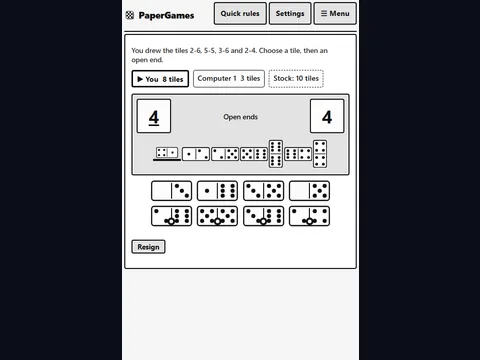
- Check the large boxes above the row of tiles, since they show the two open ends you can match.
- Click a tile in your hand that matches one of those numbers, then click the end where it goes.
- If no tile fits, click Draw from stock until you get one that does.
- If you still have no move after the stock runs out, click Pass to end your turn.
- Play your last tile to win, or hold the lowest pip total if the line gets blocked.
Dominoes Controls
| Input | Action |
|---|---|
| Click a tile, then an open end | Play a tile |
| Draw from stock button | Draw when nothing fits |
| Pass button | Skip your turn once the stock is empty |
| Show my tiles button | Reveal your hand in a shared-device game |
| New game button | Start a round with your chosen settings |
| Tap (touch screens) | Works the same as clicking |
How to Play Dominoes on PC & Chromebook
Dominoes is played with simple clicks, so it works well on a Chromebook, laptop or desktop with a mouse or trackpad. Your hand sits below the line of tiles, and the two open ends are shown in large boxes. Buttons handle drawing and passing. Everything you need fits on one screen, and there is no timer, so you can think through each turn.
- Choose a mode, how many players, a variant and a level, and then click New game.
- Click a tile in your hand that matches an open end.
- Click the end where you want the tile to go.
- Use Draw from stock or Pass when nothing fits.
Desktop tip: Before you click, look at both open ends. A tile that fits on either side might help you more on one end than the other.
How to Play Dominoes on Mobile
Dominoes is a comfortable game for phones and tablets. Its tall layout suits a phone in portrait mode, and you play everything with taps. Tap a tile, then tap the open end you want. It also works as a pass-and-play game, with each hand hidden behind a button until it is that player's turn.
- Hold your device upright and choose your game settings.
- Tap a tile in your hand, then tap the matching open end.
- Tap Draw from stock or Pass when you have no match.
- In Same device mode, tap Show my tiles when the device reaches you.
Mobile tip: When passing the device to a friend, hand it over before tapping Show my tiles so nobody else sees your hand.
Tips and Tricks
- Get your doubles out early. Since a double matches just one number, it is the tile most likely to be stranded in your hand late in the round.
- Get rid of heavy tiles like 6-5 or 6-6 first. If the line gets blocked, the player with the fewest pips left wins.
- Keep a mix of different numbers in your hand. More variety means more chances to fit the ends that show up on the table.
- Notice when an opponent has to draw. If they drew against an open 4, they probably hold no 4s, so try to keep 4s showing.
- Each number appears on seven tiles in the set. Count how many are already down to judge whether an end is about to go dead.
Game Info
| Game | Dominoes |
|---|---|
| Developer | Christopher Müller |
| Genre | Card & Board, 2 Player |
| Players | Multiplayer |
| Works on | Chromebook, PC, Mac, tablet and phone |
| Price | Free, no sign-up |
| Hosting | Served from Classroom 7x's own servers |
| License | MIT (original source, license, credits) |
Dominoes FAQ
Who goes first in Dominoes?
The round starts with whoever holds the highest double, so 6-6 comes before 5-5. Without any doubles, the opener is whichever tile has the most pips. The game chooses it automatically and names it in the status line.
How does the Triangles variant work?
In Triangles, each of the 56 three-sided tiles has a corner number from 0 to 5. Tiles go on a grid, and any corners that touch must show the same number. When you have no legal move, you draw as many as three tiles before passing.
Can friends play on one Chromebook?
Yes. Pick Same device and choose anywhere from two to four players. A player's hand stays hidden until they press Show my tiles, so the device can be passed around without anyone peeking.