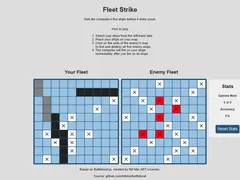
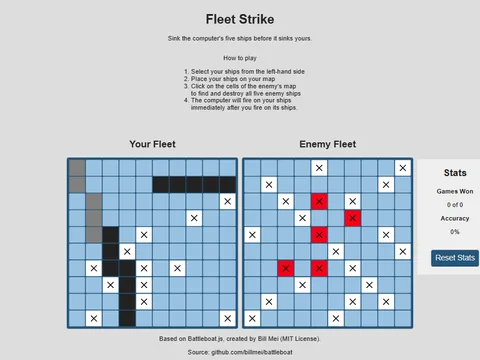
Somewhere on that blank enemy grid, five ships are waiting. Fleet Strike unblocked is a naval grid-guessing game where you hunt for hidden ships while a sharp computer opponent hunts for yours at the same time. Classroom 7x hosts it on its own servers, so it loads in Chrome on a Chromebook with no download and no sign-up.
About Fleet Strike
Fleet Strike is based on Battleboat.js, an open-source project by Bill Mei. Both you and the computer get the same fleet: an Aircraft Carrier that covers 5 squares, a Cruiser that covers 4, a Destroyer and a Submarine with 3 each, and a Patrol Boat with 2. You place your ships across or up and down on your own grid, never diagonally, and they cannot overlap or hang off the edge. Then the shooting begins.
You and the computer take turns firing at hidden squares. A white square with an X marks a miss, and a red square marks a hit. A ship sinks once every square it covers has been hit. The computer does not guess at random. For each open square, it figures out how many ways your surviving ships might still be placed across it, then fires where the odds are best. A Stats panel keeps your wins and shot accuracy in your browser.
How to Play Fleet Strike
- Pick a ship from the Place Your Ships list, then press Rotate Ship if you want to change its direction.
- Click a square on the Your Fleet grid to set the ship down, and repeat for all five.
- Press Start Game, then click any square on the Enemy Fleet grid to fire a shot.
- Watch the computer fire back at your grid right after each of your shots.
- Keep firing until one fleet is fully sunk, then press Restart Game for a new match.
Fleet Strike Controls
| Input | Action |
|---|---|
| Click a ship name | Choose which ship to place |
| Rotate Ship button | Turn the ship before placing it |
| Click Your Fleet grid | Place the selected ship |
| Click Enemy Fleet grid | Fire a shot at that square |
| Restart Game button | Start a new match |
| Tap (touch screens) | Place ships and fire with taps |
How to Play Fleet Strike on PC & Chromebook
Fleet Strike is a calm mouse game that fits a laptop, desktop or Chromebook well. Both grids sit side by side, so you can see your own fleet and the enemy waters at the same time. While placing ships, hovering over your grid shows a preview of where the ship will go, which makes setup quick and avoids mistakes.
- Click a ship name, use Rotate Ship if needed, and hover to preview its spot.
- Click a square on Your Fleet to place each of the five ships.
- Press Start Game and click squares on Enemy Fleet to fire.
- Track hits and misses, and press Restart Game when the match ends.
Desktop tip: Plan your full layout before clicking the first ship. Spread-out fleets last much longer against the computer.
How to Play Fleet Strike on Mobile
You can play Fleet Strike with taps on a phone or tablet. Tapping places ships and fires shots just like clicking. Since both grids are shown side by side and the layout shrinks to fit, the squares can get quite small on a phone. A tablet, or a phone turned sideways in fullscreen, gives you much bigger targets to tap.
- Turn your device sideways and open the game in fullscreen if you can.
- Tap a ship name, then tap Rotate Ship or a square on Your Fleet.
- Tap squares on Enemy Fleet to fire once the battle starts.
- Tap Restart Game to play another round.
Mobile tip: Zoom in with two fingers if you keep tapping the wrong square, then zoom back out to see both grids.
Tips and Tricks
- Fire at every other square in a checkerboard pattern. The smallest ship covers two squares, so this pattern still finds every ship with fewer shots.
- After a hit, test the four squares around it. Once you land a second hit, follow that line until the ship sinks.
- Think twice before hiding ships in corners. The computer's opening shots favor certain corners and the squares beside them.
- Leave gaps between your ships. If they touch, one streak of hits by the computer can uncover two ships at once.
- Mix up the directions of your ships so the computer cannot guess a pattern after it finds the first one or two.
Game Info
| Game | Fleet Strike |
|---|---|
| Developer | Bill Mei |
| Genre | Card & Board, Strategy |
| Players | Single player |
| Works on | Chromebook, PC and Mac (touch screens work, mouse is more precise) |
| Price | Free, no sign-up |
| Hosting | Served from Classroom 7x's own servers |
| License | MIT (original source, license, credits) |
Fleet Strike FAQ
How does the computer pick its shots?
It looks at every open square on your grid and counts the possible ways your surviving ships could still cover it, then shoots at the most likely square. After a hit, the squares nearby gain value, so it usually finishes ships quickly.
Can I play against a friend?
No. Fleet Strike is a single-player game against the computer. You place your fleet, the computer hides its own, and the two of you trade shots until one side has nothing left afloat.
How do I reset my stats?
Open the Stats panel and press Reset Stats. Your games won and your shot accuracy go back to zero. These numbers are stored in your browser and update when you start a new game.