IsoCity unblocked is a relaxed building toy where you design a small town one tile at a time. There is no money to track and nothing to lose, just a grid and a big palette of pieces to arrange. It runs on Classroom 7x's own servers, so it opens in Chrome with no download or sign-up, and your town is saved for next time.
About IsoCity
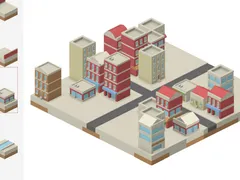
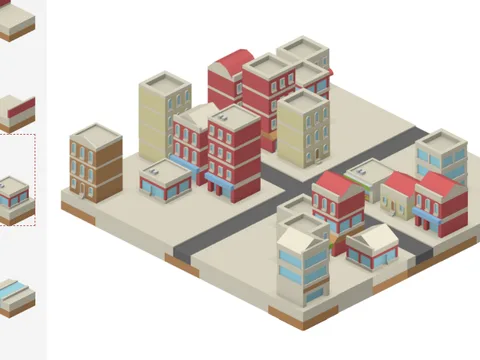
Victor Ribeiro wrote IsoCity as an open-source project, and the colorful city tiles come from Kenney's free art library. The map is a fixed 7 by 7 block of 49 squares, drawn at an angle so buildings look three-dimensional. A palette holds more than seventy pieces, including straight roads, curves, crossings, crosswalks, canals, low walls, shops, offices and apartment buildings. Placing a piece swaps out whatever stood on that square before.
Since there is no budget, score or population, the only goal is the one you invent. You might build a neat street grid, a waterfront with canals, or a crowded downtown block. Road pieces each have a fixed shape and direction, so matching them to their neighbors is part of the fun. A shaded diamond shows which square you are about to change. Our version saves your town in the browser every time you place a tile, so it is waiting when you return.
How to Play IsoCity
- Scroll through the palette on the side and click the tile you want to place.
- Pick a square on the map and click it, and the tile you chose lands there.
- Hold the mouse button and drag to paint the same tile across several squares.
- Right-click a square to clear it and turn it back into plain ground.
- Mix roads, water and buildings until the town looks the way you want.
IsoCity Controls
| Input | Action |
|---|---|
| Click a palette tile | Choose the piece to place |
| Click a map square | Place the chosen piece |
| Click and drag | Paint the same piece over many squares |
| Right-click | Clear a square to plain ground |
| Tap a palette tile, then a square (touch) | Place pieces on a touch screen |
| Plain ground tile + tap (touch) | Clear a square on a touch screen |
How to Play IsoCity on PC & Chromebook
On a Chromebook or laptop, IsoCity feels like a digital sketchbook. The mouse does everything: pick a tile from the palette, click the map to place it, and right-click to erase. Holding the button while you drag lets you paint long streets or rows of buildings in one motion. A mouse makes erasing a little easier than a trackpad, but both work.
- Choose a tile from the palette on the side of the screen.
- Click any map square to place it there, or drag across several to paint them.
- Right-click any square to clear it.
- Keep editing until you like the layout, since everything saves automatically.
Desktop tip: On a Chromebook trackpad, a two-finger tap works as a right-click, which clears the square under the pointer.
How to Play IsoCity on Mobile
IsoCity works on phones and tablets with taps. Tap a tile in the palette, then tap a square on the map to place it. Drag painting and right-click erasing are mouse features, so on touch you build one square at a time. To clear a square, place the plain ground tile on it. A sideways screen gives the map more room.
- Turn your device sideways and open the game.
- Tap a tile in the palette to select it.
- Tap a square on the map to place the tile.
- Pick the plain ground tile and tap any square you want to clear.
Mobile tip: Squares are small on a phone screen, so tap near the middle of each diamond to make sure you change the right one.
Tips and Tricks
- Lay out the roads before adding buildings. Tall towers can hide the squares behind them, which makes later road work harder to see.
- Put the tallest buildings toward the back of the map. Pieces near the front are drawn on top and can cover shorter shops behind them.
- Look closely at each road tile in the palette and check which edges it opens on, so it lines up with the pieces next to it.
- Use a line of canal tiles as a border around a park or a shopping strip. It gives the block a clean, finished edge.
- To wipe a whole area quickly, select the plain ground tile and drag it across every square you want to reset.
Game Info
| Game | IsoCity |
|---|---|
| Developer | Victor Ribeiro |
| Genre | Strategy |
| Players | Single player |
| Works on | Chromebook, PC, Mac, tablet and phone |
| Price | Free, no sign-up |
| Hosting | Served from Classroom 7x's own servers |
| License | MIT (original source, license, credits) |
IsoCity FAQ
Can I win or lose in IsoCity?
No, because the game has no money, timer or score. You decide what counts as finished, whether that is a tidy grid of streets, a harbor town or a packed city center with towers on every corner.
Will my town be saved?
Yes. Each time you place a tile, this version saves your layout in your browser. As long as you keep your site data, it comes back the next time you open the game on that same device and browser.
Why don't my roads connect?
Road pieces have fixed shapes and directions. A straight road can run either of two ways, while corners, crossings and dead ends point in only one direction each. Before placing, compare the palette picture with the neighboring squares.