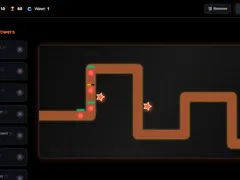
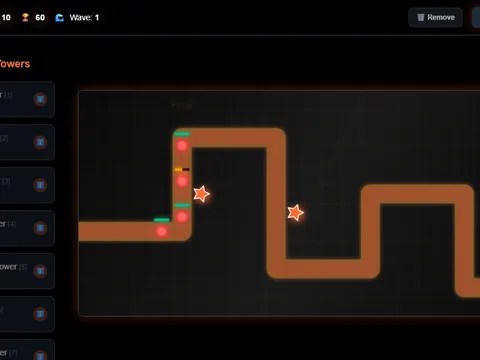
PoliGuard unblocked is an endless tower defense game made of simple, glowing shapes. Enemies march along a zigzag road, and your towers fire on them automatically. There is no final wave, so the goal is to survive as long as you can. Classroom 7x hosts it on its own servers, and it plays best with a mouse and keyboard.
About PoliGuard
Ion Mateus built PoliGuard with a clean geometric style. Red enemies follow an orange road across a dark grid, and your defenses are stars, squares, pentagons and diamonds. There are seven tower types, including a Basic Tower, an Ice Tower that slows enemies, a Sniper Tower with heavy shots and an Explosive Tower with splash damage. You start each game with 100 coins and 10 lives, and every enemy you defeat pays more coins.
PoliGuard handles upgrades in an unusual way. Upgrading a tower type makes every tower of that type stronger, even those you place later, which rewards sticking with a few favorites. Wave one sends five enemies, and each wave after it adds more foes with extra health and speed. Every enemy that makes it to the end of the road takes away a life, and the run is over once all ten are gone.
How to Play PoliGuard
- Choose a tower by clicking it in the left panel or by pressing a number key from 1 to 7.
- Click any open square off the road, and look for the green outline that confirms a valid spot.
- Let your towers fire on their own as the first wave of five enemies walks the road.
- Spend coins between waves on new towers or on upgrades from each tower card's i button.
- Right-click a tower to change who it targets, and pause whenever you need time to plan.
PoliGuard Controls
| Input | Action |
|---|---|
| 1 to 7 | Pick a tower type |
| Left click | Place the picked tower on an empty square |
| Esc | Cancel the current choice |
| Delete or Remove button | Remove towers for a partial refund |
| Right-click a tower | Set its targeting |
| i button on a tower card | Upgrade that tower type |
| Scroll wheel / drag | Zoom and pan the map |
| Pause, then 0.5x, 1x or 2x | Pause and change game speed |
How to Play PoliGuard on PC & Chromebook
PoliGuard is made for a computer, so a Chromebook or laptop is the right place to play. The mouse handles most of the work: clicking to place towers, right-clicking to set targets and scrolling to zoom the map. Number keys 1 to 7 let you grab towers fast, Esc cancels a choice and Delete switches on remove mode. You can also slow the game to half speed.
- Press a number from 1 to 7 or click a tower in the left panel.
- Build by left-clicking any free square beside the road.
- Right-click a tower to change its targeting.
- Click Pause, then pick 0.5x, 1x or 2x speed.
Desktop tip: On a Chromebook trackpad, a two-finger tap works as a right-click, which is how you change a tower's targeting.
How to Play PoliGuard on Mobile
PoliGuard is not built for phones or tablets. The tower panel takes up a fixed strip on the left, and key features like right-click targeting, scroll-wheel zoom and number shortcuts have no touch equivalent. You would miss too much of the game on a small screen. For the full experience, open it on a Chromebook, laptop or desktop computer with a mouse.
- Open Classroom 7x on a Chromebook, laptop or desktop.
- Find PoliGuard and press Play.
- Use the mouse to place towers and the number keys to switch between them.
Mobile tip: On a phone right now? Bookmark the page and come back to PoliGuard on a computer. Many other games on the site work fully with touch.
Tips and Tricks
- Your starting 100 coins buy exactly two Basic Towers. Place both early, since they handle the first few waves without trouble.
- Build on the inside of the road's bends. A tower tucked into a corner can fire at enemies on both sides of the turn.
- Pair an Ice Tower with damage towers. It halves enemy speed for three seconds, giving nearby towers extra shots on each target.
- Set Sniper Towers to Strongest with a right-click, so their heavy shots target the toughest enemy within range.
- Removing a tower only returns 70 percent of its base price, and upgrade money is not refunded. Think before you build.
Game Info
| Game | PoliGuard |
|---|---|
| Developer | Ion Mateus |
| Genre | Strategy |
| Players | Single player |
| Works on | Chromebook, PC and Mac (keyboard required) |
| Price | Free, no sign-up |
| Hosting | Served from Classroom 7x's own servers |
| License | MIT (original source, license, credits) |
PoliGuard FAQ
Do upgrades affect just one tower?
No. An upgrade bought from a tower card applies to every tower of that type, including future ones. That is why focusing on two or three tower types usually works better than buying one of each.
Is there a last wave in PoliGuard?
No. Waves keep coming, and each one has more enemies that are tougher and faster. The run ends when you lose your tenth life, and the game shows your final points so you can try to beat them.
Can I play PoliGuard on a phone?
Not really. It is designed for a desktop screen with a mouse and keyboard. Right-click targeting, scroll-wheel zoom and number key shortcuts have no touch versions, so a Chromebook or laptop is the way to go.