Six-sided cells change how far a turret can reach along a twisting road. Hex Formation unblocked is a compact tower defense game with three maps, three towers and ten waves to survive. Classroom 7x serves it from its own servers, so you can play in Chrome on a Chromebook without installing anything or making an account.
About Hex Formation
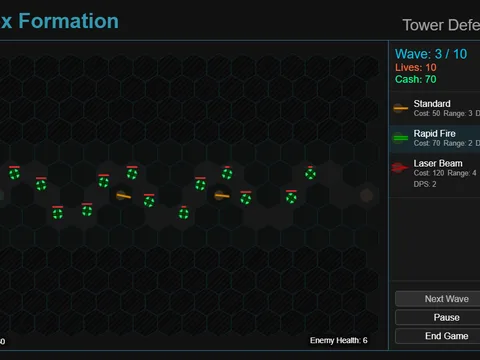
Hex Formation is a Mason Blier game, and every piece of it is drawn in code on a canvas. From a start cell, a stream of spinning green enemies rolls along a gray path to the exit. To halt them, you place turrets on the solid dark cells next to that path. A hexagon can touch as many as six neighbors, so a turret placed on a bend often covers more road than a square grid would allow. Three maps are offered: alternating, zig-zag and loopback.
Your starting funds are 100 cash and 10 lives. A Standard tower costs 50, a Rapid Fire tower shoots quickly but only at short range, and the 120-cash Laser Beam holds a steady beam on a single target. Every enemy you destroy is worth twice the health it started with. In wave one, enemies have 3 health, and by wave ten that rises to 40. Clear all ten waves to win. The browser stores your best winning score for each map.
How to Play Hex Formation
- Before placing anything, choose one of the three maps: alternating, zig-zag or loopback.
- Choose Standard, Rapid Fire or Laser Beam from the side panel, and then click any dark hexagon next to the path.
- Press Start Game, and enemies begin rolling out toward the exit two per second.
- Click a built tower to see its range, then choose Upgrade or Sell as your cash allows.
- Press Next Wave to call the following group early once the current wave has fully entered the map.
Hex Formation Controls
| Input | Action |
|---|---|
| Click a tower type | Choose Standard, Rapid Fire or Laser Beam |
| Click a dark hexagon | Build the chosen tower |
| Click a built tower | Select it and show its range |
| Upgrade / Sell buttons | Improve or sell the selected tower |
| Start Game / Next Wave | Start wave one, or send in the next wave early |
| Pause / Resume / End Game | Pause, continue or quit |
| Tap (touch screens) | Select, build and press buttons |
How to Play Hex Formation on PC & Chromebook
Hex Formation was designed for a desktop layout, so it feels most natural with a mouse on a laptop, desktop or Chromebook. The map sits in the middle with a side panel for choosing towers and buttons for upgrades, waves and pausing. Everything is a click, and the layout scales down to fit the game window, so no keyboard is needed.
- Choose a map, then click a tower type in the side panel.
- Click dark hexagons beside the path to place your first towers.
- Click Start Game, and select towers later to upgrade or sell them.
- Use Pause whenever you need a moment to plan.
Desktop tip: Pause between waves and click each tower to view its range. Gaps in coverage are easy to spot that way.
How to Play Hex Formation on Mobile
On a touch screen, taps handle everything in Hex Formation, from picking and building towers to pressing each button. However, the screen uses a fixed desktop layout that simply scales down. Small phones make the hexagons, buttons and text tiny and easy to miss. Holding a tablet sideways shows the whole map at a much more comfortable size.
- Use a tablet if you can, and turn it sideways.
- Pick a tower type by tapping its name, then tap a dark hexagon next to the path.
- Tap Start Game, and tap towers later to upgrade or sell them.
Mobile tip: Remember to tap a tower type again after selecting a built tower, or your next tap will not build anything.
Tips and Tricks
- Spend your starting 100 cash on two Standard towers. That is the only way to have two guns ready before the first wave arrives.
- Look for spots where the path doubles back. A single turret placed there may cover two or even three sections of road.
- Save up for a Laser Beam. It has the longest range and never misses, which makes it great against tougher later waves.
- Place Rapid Fire towers right on tight corners. Their range is short, so they work best where enemies stay close for longer.
- Before spreading out, level up a few strong towers. Every upgrade adds damage and range, and you can read a tower's level from its dots.
Game Info
| Game | Hex Formation |
|---|---|
| Developer | Mason Blier |
| Genre | Strategy |
| Players | Single player |
| Works on | Chromebook, PC and Mac (touch screens work, mouse is more precise) |
| Price | Free, no sign-up |
| Hosting | Served from Classroom 7x's own servers |
| License | MIT (original source, license, credits) |
Hex Formation FAQ
Why can I not build on some cells?
Enemies travel on the lighter gray cells, and the striped cells along the border sit outside the playing field. You can build only on solid dark cells, and only if you can afford the tower type you selected.
Why did building stop after I clicked a tower?
Clicking a tower that is already built clears your build choice, which lets you upgrade or sell it. To place another tower, pick Standard, Rapid Fire or Laser Beam from the side panel once more.
How is the final score counted?
Once all ten waves are cleared, the game totals up what remains. Lives count for much more than leftover cash, and each destroyed enemy adds a small amount. Your top winning result for every map stays saved.