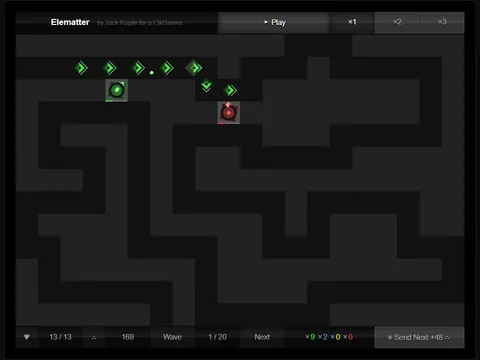
In this tower defense game, picking the right element matters more than picking the right spot. Elematter unblocked asks you to counter Earth, Water, Air and Fire enemies with the tower that beats them. Classroom 7x runs it from its own servers, so you can play in Chrome on a Chromebook with no download and no account.
About Elematter
Jack Rugile made Elematter for the 2014 js13kGames contest, where every entry had to fit in 13 kilobytes. Its shapes are drawn with HTML and CSS, and its sound effects are generated in code. Enemies come in four elements, and so do your towers. A tower hits one kind of enemy 50 percent harder than normal. Earth beats Air, Air beats Water, Water beats Fire, and Fire beats Earth. Learning that loop is the heart of the game.
You start with 500 fragments, the money used for building, and thirteen lives. The cheapest tower is Earth at 200. Air and Fire are 250 each, and Water is the priciest at 300. Each tower can be upgraded twice, and reclaiming one gives back 75 percent of what you spent. Enemies grow tougher every wave, and waves 5, 10, 15 and 20 bring a large boss. Clear all twenty waves to win, and your score adds 100 points for each life you kept.
How to Play Elematter
- To build, click any empty gray square that sits beside the road, and the build menu will open.
- Choose Earth, Water, Air or Fire, checking the stats for damage, range and fire rate first.
- Press Play to start, and watch enemies walk in from the left along the twisting path.
- Click a tower to upgrade it when the white marker shows you can afford the next level.
- Read the Next counter to see what elements are coming, and build the towers that counter them.
Elematter Controls
| Input | Action |
|---|---|
| Click an empty square | Open the build menu |
| Click an element | Build an Earth, Water, Air or Fire tower |
| Click a tower | Upgrade it or reclaim it for fragments |
| Play button | Start or pause the game |
| x1 / x2 / x3 | Change the game speed |
| Send Next button | Call the next wave early for bonus fragments |
| Tap (touch screens) | Build, upgrade and press every button |
How to Play Elematter on PC & Chromebook
Elematter is easiest to play with a mouse on a laptop, desktop or Chromebook. Hovering over each element in the build menu shows its damage, range and fire rate, which helps you choose. All the controls are buttons, so you never need the keyboard. The board scales to fit the window, and a bigger screen makes the small squares beside the road easier to click.
- Click an empty square beside the path and hover over each element to compare stats.
- Click the element you want to build, then press Play to send the first wave.
- Click towers to upgrade them whenever a white marker appears.
- Use x2 or x3 to speed up calm waves, and Send Next when you feel safe.
Desktop tip: Pause before boss waves and check the Next counter. A few seconds of planning can save several lives.
How to Play Elematter on Mobile
Elematter responds to taps, so you can build, upgrade and press every button on a phone or tablet. There are two catches. Tower stats appear on hover, which touch screens do not have, and the board gets small on a phone. A tablet held sideways works much better, and you can learn the tower costs from this page before you start.
- Turn your tablet or phone sideways for the widest board.
- Tap an empty square next to the road, then tap an element to build.
- Tap a tower and then its button to upgrade or reclaim it.
- Tap Play and the speed buttons to control the pace.
Mobile tip: Zoom out of the browser page if buttons are cut off, so the whole board and bottom bar fit on screen.
Tips and Tricks
- Build two Fire towers before the first wave. The opening waves are made up mostly of Earth enemies, which Fire handles best.
- Prepare for bosses ahead of time. They come as Earth, Water, Air and then Fire, so have an upgraded counter tower ready for each one.
- Place Air towers inside bends. They have the longest range, so a tower in a curve can reach several stretches of road.
- Set Water towers along long straight sections. They slow what they hit and choose random targets, spreading the slow across a crowd.
- Press Send Next quickly when your defense is holding. The bonus is largest right after a wave starts and shrinks the longer you wait.
Game Info
| Game | Elematter |
|---|---|
| Developer | Jack Rugile |
| Genre | Strategy |
| Players | Single player |
| Works on | Chromebook, PC and Mac (touch screens work, mouse is more precise) |
| Price | Free, no sign-up |
| Hosting | Served from Classroom 7x's own servers |
| License | MIT (original source, license, credits) |
Elematter FAQ
How do I earn more fragments?
Every enemy you destroy pays fragments, and later waves pay a bit more. Bosses pay triple. Calling the next wave early earns a bonus, but it gets smaller as you wait. Reclaiming a tower returns 75 percent of its cost.
What happens when I run out of lives?
You lose one life for every enemy that makes it all the way along the road. If your thirteen lives drop to zero, the game resets so you can start a fresh attempt from the first wave.
How fast can I make the game go?
Use the x1, x2 and x3 buttons to change the speed. Faster speeds help when your towers are strong, while x1 gives you more time to react to bosses and mixed waves.