Evolving Civilization unblocked starts with a single cell and slowly becomes a full city builder. You click to make RNA, evolve body parts and eventually reach sentience. From there, the game is all about jobs, buildings and research. Classroom 7x serves it from its own servers, and progress saves in your browser automatically, so you can come back any time.
About Evolving Civilization
This is Evolve, an open-source incremental game by Peter Motschmann (also known as Demagorddon), shown here under a new name. Life begins in the primordial ooze. You collect RNA, combine two RNA to make one DNA, and spend both on parts for your cell. Each Membrane lifts the cap on stored RNA, Organelles produce RNA without your help, and Nuclei convert RNA into DNA. You also choose between branches, such as Chloroplasts or Phagocytosis, and those picks shape the species you end up with.
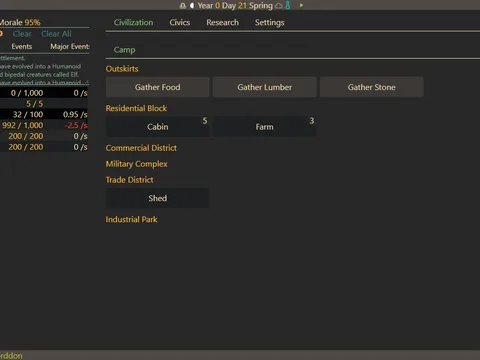
Once Sentience appears, buying it founds your civilization, and the Evolve tab turns into your first camp. Food, lumber and stone are collected by hand at first. With them you put up housing, farms and storage, give citizens jobs and start research. Each upgrade unlocks more buildings and tabs. Far into the game, resets become available that award Plasmids, which raise production on the following run. Step away for two minutes or more, and the missed time comes back as faster play.
How to Play Evolving Civilization
- Click the RNA button to gather it, then use Form DNA to turn two RNA into one DNA.
- Buy cell parts such as Organelles and Nuclei so RNA and DNA start building up on their own.
- Read the tooltips before each branch choice, since every path changes the species you will become.
- Buy Sentience when it appears to found your civilization and move into the city stage.
- Gather resources, build housing and farms, assign citizens to jobs and research upgrades to grow your camp.
Evolving Civilization Controls
| Input | Action |
|---|---|
| Click or tap a button | Gather, build or research |
| Ctrl / Shift / Alt + click | Perform an action 10, 25 or 100 times at once |
| Number keys 1 to 7 | Switch to a main tab; a second press opens its sub-tabs |
| Hover over a button | See costs and effects |
| Pause icon in the top bar | Pause or resume the game |
How to Play Evolving Civilization on PC & Chromebook
Evolving Civilization is a text-heavy game with lots of buttons and tooltips, so a computer screen suits it best. Hover over any button to see its cost and effect before you buy. Number keys 1 to 7 jump between the main tabs, and holding Ctrl, Shift or Alt while you click repeats an action several times. These key bindings can be changed in Settings.
- Click RNA to gather your first resource, then click Form DNA.
- Hover over cell parts to compare their costs before you buy.
- Press number keys 1 to 7 to move between the main tabs.
- Hold Shift and click to gather or build 25 times at once in the city stage.
Desktop tip: Do not worry about stepping away. Time away of two minutes or more comes back as accelerated time, so a short break does not slow your progress much.
How to Play Evolving Civilization on Mobile
Evolving Civilization responds to taps, and a phone turned sideways fits the layout. A bigger screen still suits it better. Held upright, the phone can push action buttons out of view, and the cost tooltips rely on hovering, which touch screens cannot really do. For long sessions, a Chromebook or laptop is more comfortable.
- Turn your phone sideways so the action buttons stay on screen.
- Tap buttons to gather resources, build and research.
- Tap the pause icon in the top bar when you want to stop the clock.
Mobile tip: Use a tablet instead of a phone if you can. The wider screen keeps more buttons in view, so you scroll less between gathering and building.
Tips and Tricks
- Buy Organelles before extra Membranes. Organelles keep making RNA while you wait, but storage only helps once you can actually fill it.
- Cheap parts are a trap if you stack too many. Membrane prices rise with each one you buy, and that eats RNA you need for Nuclei and milestones.
- Hold Shift while clicking in the city stage to gather or build 25 at a time. It saves a huge number of clicks.
- Leave the message log visible. It is the first place events, discoveries and warnings appear, and its filters make older messages easy to find.
- Export your save from Settings every so often. A text copy protects your progress if your browser data ever gets cleared.
Game Info
| Game | Evolving Civilization |
|---|---|
| Developer | Peter Motschmann (Demagorddon) |
| Genre | Strategy, Clicker & Idle |
| Players | Single player |
| Works on | Chromebook, PC and Mac (touch screens work, mouse is more precise) |
| Price | Free, no sign-up |
| Hosting | Served from Classroom 7x's own servers |
| License | MPL-2.0 (original source, license, credits) |
Evolving Civilization FAQ
Why are some buttons darker than others?
It is shaded darker because you lack the resources right now. Hovering shows the cost. Each copy you buy raises the price, so setting up automatic RNA and DNA production early makes things easier.
What happens when I choose Sentience?
Your path so far decides the traits of the new species. In place of the Evolve tab you get your first camp, where you collect food, lumber and stone and begin working toward automation.
Will closing the tab erase my progress?
No. Saving to your browser happens automatically. After an absence of two minutes or more, the lost time comes back as accelerated time, which makes the game run twice as fast until it runs out.