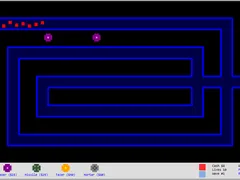
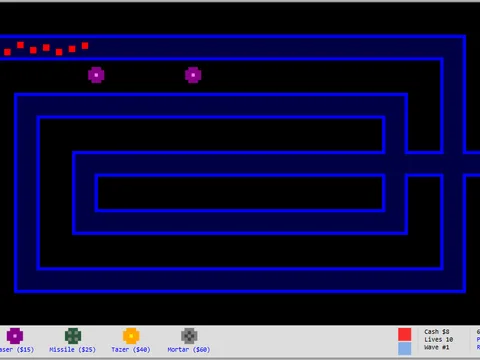
Canvas Tower Defense unblocked is an endless defense game with a neon, retro look. Red creeps follow a glowing road, and your turrets have to stop them before they reach the end. Classroom 7x serves the game from its own servers, so you can start a run in Chrome without downloading anything or signing up for an account.
About Canvas Tower Defense
Teddy Cross created the open-source original, called Canvas TD. You pick one of three maps, named Loopy, Backtrack and Dash, and each has a very different path shape. You start with $35 and ten lives. Four turret types are available: Laser, Missile, Tazer and Mortar. The reward for a destroyed creep matches the number of the wave it came in, so the money grows as the waves go on. You spend that cash on new turrets and upgrades.
Every turret can be upgraded up to level 10 in damage, fire rate and range, and maxing all three unlocks a special bonus. Waves arrive on a timer and creep health keeps rising, so no defense stays safe for long. A creep that reaches the end costs one life, and the run ends when all ten are gone. Your score is kills multiplied by money spent, and the top five runs on each map are saved in your browser.
How to Play Canvas Tower Defense
- Choose a map on the start screen to begin with $35 and ten lives.
- Pick a turret from the bottom bar, then click an open spot beside the path.
- Select a placed turret to upgrade its damage, fire rate or range.
- Send the next wave early when your defense is strong, or let the timer run.
- Keep building and upgrading as the creeps grow tougher with each new wave.
Canvas Tower Defense Controls
| Input | Action |
|---|---|
| 1 / 2 / 3 / 4, then click | Build a Laser, Missile, Tazer or Mortar |
| Click a turret | Select it |
| 1 / 2 / 3 (turret selected) | Upgrade damage, rate or range |
| 4 (turret selected) | Move the turret for $90 |
| Shift + 8 (*) | Sell the selected turret |
| Enter | Send the next wave now |
| = | Toggle fast forward |
| Esc | Deselect, cancel or pause |
| Tap turret buttons and map (touch) | Build, select and upgrade on a touch screen |
How to Play Canvas Tower Defense on PC & Chromebook
Canvas Tower Defense has a full set of keyboard shortcuts, which makes it quick to play on a Chromebook or laptop. Number keys pick turrets and upgrades, Enter calls the next wave, and the equals key toggles fast forward. You can also do everything with the mouse by clicking the buttons in the bottom bar. Mixing both is often the fastest way.
- Click a map to start, then press 1 to 4 to choose a turret.
- Click an empty spot next to the path to place it.
- Click a turret and press 1, 2 or 3 to upgrade damage, rate or range.
- Press Enter to send a wave early, or = to speed up time.
Desktop tip: Use fast forward during the easy early waves, then switch it off when creeps start getting close to the end of the road.
How to Play Canvas Tower Defense on Mobile
Canvas Tower Defense can be played on a phone or tablet, with a few limits. Building turrets, selecting them and buying upgrades all work with taps. The keyboard shortcuts are not available, though, and some of the smaller buttons can be fiddly on a phone. The game is wide, so turn your device sideways to see the whole map and the button bar.
- Turn your device sideways and tap a map to begin.
- Tap a turret in the bottom bar, then tap an open spot beside the path.
- Tap a placed turret and use the Damage, Rate and Range buttons to upgrade it.
- Tap the red square at the bottom right to send the next wave early.
Mobile tip: A tablet gives you much more room than a phone. Bigger targets make it easier to place turrets exactly where you want them.
Tips and Tricks
- Start with lasers. At only $15 each, you can buy two right away, and they shoot rapidly at whichever creep is leading.
- On Loopy and Backtrack, build turrets on the inside of each bend. From that spot, one turret can cover two or even three separate sections of the path.
- Put a tazer near your strongest damage turrets. Slowed creeps stay in range longer and take more hits before they escape.
- Upgrade one good turret before buying many weak ones. Creep health climbs fast, and spread-out damage quickly falls behind.
- Avoid selling when you can. You only get part of the cost back, and the refund lowers the money-spent half of your score.
Game Info
| Game | Canvas Tower Defense |
|---|---|
| Developer | Teddy Cross |
| Genre | Strategy |
| Players | Single player |
| Works on | Chromebook, PC and Mac (touch screens work, mouse is more precise) |
| Price | Free, no sign-up |
| Hosting | Served from Classroom 7x's own servers |
| License | MIT (original source, license, credits) |
Canvas Tower Defense FAQ
How is the score calculated?
To get your score, the game multiplies your creep kills by the total money you have spent on turrets and upgrades. When you sell a turret, its refund comes off that spending total, so selling usually lowers your score.
What do fully upgraded turrets do?
When a turret reaches level 10 in damage, rate and range, it gains a bonus. Lasers can send creeps back to the start, missiles splash nearby creeps, tazers slow targets for good, and mortars set creeps on fire.
Does the game ever end?
Not on its own. New waves keep coming and creep health keeps rising. The only way a run ends is when your lives reach zero, which happens after ten creeps get past your defenses.