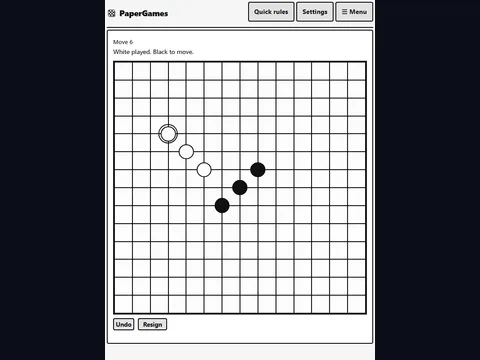
Gomoku unblocked is a strategy game for two sides, black and white, taking turns on a 15x15 grid. The first to line up five stones in a row wins. It takes a minute to learn and a long time to master. Classroom 7x hosts it directly, so you can open it in Chrome and play the computer or a friend right away.
About Gomoku
Christopher Müller made this Gomoku for his open-source PaperGames collection. Black moves first. After that, the two sides alternate, each setting a single stone on any empty point where the grid lines meet. Once placed, a stone stays put and cannot be captured, so the board just keeps filling up. The five stones can line up in a row, in a column or on a slant, pointing either way. A full board with no five-in-a-row means the game is a draw.
The game uses freestyle rules, which means a line of six or more also counts as a win and black has no forbidden moves. You can play a friend on the same device or take on the computer at Easy, Medium or Hard. Hard checks for winning and blocking points and then looks a few moves ahead. An extra ring marks the latest stone, and your browser keeps the current game saved.
How to Play Gomoku
- Choose 2 Player (local) to share the device, or vs Computer to pick a color and a level.
- Click or tap any empty intersection to place one stone of your color on your turn.
- Build lines of your stones across, down or diagonally while watching what your opponent is building.
- Block any open row of three right away, before it can grow into a row of four.
- Win by connecting five or more of your stones with no gaps, in any straight direction.
Gomoku Controls
| Input | Action |
|---|---|
| Click or tap an intersection | Place a stone |
| Arrow keys + Enter | Move between points and place a stone with the keyboard |
| Undo button | Take back your last stone (and the computer's reply) |
| Resign button | Give up the current game |
| 2 Player (local) / vs Computer | Choose a game mode |
How to Play Gomoku on PC & Chromebook
Gomoku is easy to play with a mouse or touchpad on a Chromebook or laptop. Click any empty point on the grid to drop a stone there. If you prefer the keyboard, the arrow keys move between points and Enter places your stone. The status line above the board always tells you whose turn it is and who played last.
- Click vs Computer, choose your color and level, then click New game.
- Click an empty intersection to place your first stone.
- Watch the ringed stone to see where your opponent just played.
- Click Undo to take back a move, or Resign to start fresh.
Desktop tip: Before each move, scan all four directions around the newest stone. Many surprise losses come from a diagonal line you did not notice.
How to Play Gomoku on Mobile
Gomoku works well on phones and tablets because every move is a single tap. Hold your phone upright, since the board and buttons are laid out in a tall column. Tap an empty point to place a stone. Two friends can take turns on one device, and your unfinished game stays saved in the browser between visits.
- Hold your device upright so the full grid fits on screen.
- Tap 2 Player (local) or vs Computer to pick a mode.
- Tap an empty intersection to place your stone.
- Tap Undo if you placed a stone on the wrong point.
Mobile tip: The 15x15 grid has small points on a phone. Tap with the tip of your finger, and use Undo right away if a stone lands one point off.
Tips and Tricks
- Pay attention to whether each line has open ends. Three stones with space on both sides can be a bigger threat than four that are capped at one end.
- Look for one stone that makes two threats at once, like two open threes. Your opponent can only block one of them.
- Open your game close to the middle of the board, where a line has space to extend in all directions.
- Leave a small gap in a line on purpose. A pattern like stone, stone, gap, stone is easy to miss but can still become five.
- Take black when you play the Hard computer. Moving first is a real edge under freestyle rules, which helps while you learn its habits.
Game Info
| Game | Gomoku |
|---|---|
| Developer | Christopher Müller |
| Genre | Card & Board, 2 Player |
| Players | 1 or 2 players |
| Works on | Chromebook, PC, Mac, tablet and phone |
| Price | Free, no sign-up |
| Hosting | Served from Classroom 7x's own servers |
| License | MIT (original source, license, credits) |
Gomoku FAQ
Does a line of six count as a win?
Yes. Under the freestyle rules used here, five or more stones in a row without a gap all count as a win. Black also faces no extra restrictions, which some tournament versions add.
How does the computer pick its moves?
The computer considers only the empty points close to existing stones. On Easy it picks among them randomly. Medium will grab a win or stop yours whenever it can, and Hard adds a short look a few moves into the future.
Can stones be captured or moved?
No. Every stone remains where it was set for the rest of the game. Because the board only fills up, every stone matters, and a careless placement can hand your opponent an opening.