Snakes and Ladders unblocked is the classic dice race where anyone can win and a single roll can change everything. Play with friends on one device, add computer players, or mix both. Classroom 7x hosts it directly, so it opens in Chrome with no download or sign-up, and it is simple enough for younger kids too.
About Snakes and Ladders
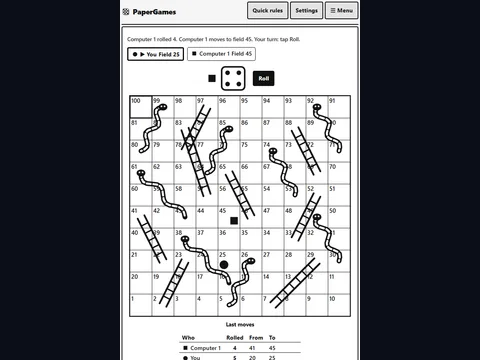
Christopher Müller made this version as part of his open-source PaperGames collection, drawing the board in clean black and white. Every token waits beside the board until its first roll brings it on. The fields zigzag upward from the bottom left, running one way on a row and the opposite way on the next. Stop at the bottom of a ladder and you climb to the top. Stop on a snake's head and you slide down to its tail.
Two boards are included. The full board has 100 fields with eight ladders and eight snakes, and a shorter 50-field board has four of each, which suits younger players. Two to four people can play, and up to three of them can be run by the computer. Each player picks a token shape: circle, square, triangle or star. A table under the board lists recent moves, and your browser stores any unfinished game.
How to Play Snakes and Ladders
- Choose a board, the finish rule, the number of players and how many the computer runs.
- Pick who starts and select your token shape, then begin a new game.
- When your turn comes, press Roll and count along as your token advances the number on the die.
- Climb any ladder you land at the bottom of, and slide down any snake head.
- Reach the last field on the board before everyone else to win the game.
Snakes and Ladders Controls
| Input | Action |
|---|---|
| Click or tap Roll | Roll the die |
| Click or tap Continue | Have a computer player make its move |
| Click or tap New game | Start a game with the chosen setup |
| Click or tap Menu | Show the setup options again |
How to Play Snakes and Ladders on PC & Chromebook
Snakes and Ladders is played with a few simple clicks, so it is easy on any Chromebook or laptop. The setup screen lets you pick the board, the finish rule, the number of players and how many the computer controls. During the game, one Roll button does almost everything. It is a nice pick to share with a friend sitting next to you.
- Choose your board, players and finish rule, then click New game.
- Click Roll on your turn and watch your token move.
- When a computer player is up, click Continue so it can move.
- Click Menu at any time to see the setup options again.
Desktop tip: When several people share one computer, agree on whose shape is whose before the first roll so turns do not get mixed up.
How to Play Snakes and Ladders on Mobile
Snakes and Ladders works smoothly on phones and tablets, since every action is a tap. The board fits a tall screen, so hold your phone upright. A tablet is great for family play because everyone can see the board while passing it around. If the page reloads, your browser brings the unfinished game right back.
- Hold your device upright and set up the players and board.
- Tap New game to begin.
- Tap Roll on your turn, and Continue for computer turns.
- Tap Menu to check or change the setup.
Mobile tip: Passing a phone between players? Hand it over only after the token stops moving, so the next person does not tap Roll by mistake.
Tips and Tricks
- Start young players on the 50-field board. With five rows and fewer snakes, games are shorter and easier to follow.
- Choose the exact-finish rule if you want a tense ending. A trailing player can catch up while the leader waits for the right number.
- Keep computer turns on the tap-to-continue setting when playing with kids. It gives everyone time to see each move.
- After a big slide or climb, check the move table below the board. Seeing the roll beside the start and end fields is good counting practice.
- Let each player choose a different token shape. Shapes are easy to tell apart, even when several tokens share a crowded row.
Game Info
| Game | Snakes and Ladders |
|---|---|
| Developer | Christopher Müller |
| Genre | Card & Board, 2 Player |
| Players | Multiplayer |
| Works on | Chromebook, PC, Mac, tablet and phone |
| Price | Free, no sign-up |
| Hosting | Served from Classroom 7x's own servers |
| License | MIT (original source, license, credits) |
Snakes and Ladders FAQ
Do I need an exact roll to finish?
That depends on which rule you choose. Under spare pips are lost, overshooting the end still counts as finishing. Under exactly onto the last field, your token stays put whenever the roll would carry it past the end.
Can the computer take its turns automatically?
Yes. Switch computer moves to automatically, and computer players will roll on their own after a short pause. By default the game waits for a tap on Continue so nobody misses what happened on the board.
Can I play alone?
Yes. Set up a game with one human player and let the computer run the others. You can have up to three computer opponents on either the 100-field or the 50-field board.