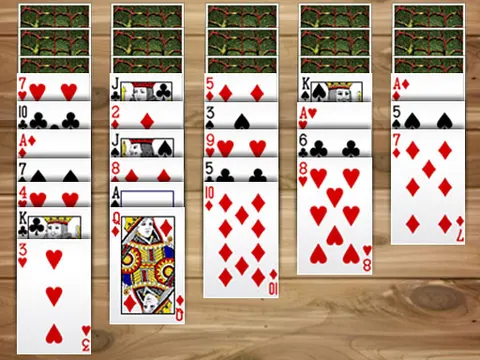
Spider Solitaire unblocked is a patient card game that rewards planning more than luck. You work with 104 cards spread across ten columns, slowly sorting them into complete suits. Classroom 7x hosts this copy directly, so it opens in Chrome on a Chromebook with no download and no login, and your game is saved if you need to stop.
About Spider Solitaire
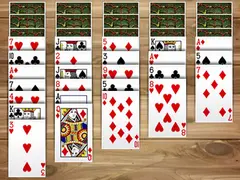
Christopher Müller created this version for his open-source PaperGames collection. The table starts with fifty-four cards dealt into ten columns, and only the bottom card of each column is face up. The other fifty cards wait in the stock. Any card can go on a card exactly one rank higher, no matter the suit, and an empty column accepts anything. Your goal is to build eight complete runs from King down to Ace, each in a single suit.
Before dealing, you choose how many suits to use. One suit is the gentlest, two suits is the default, and four suits makes long matching runs rare and the game much tougher. Groups of cards can only move together if they already form one same-suit run. When you get stuck, the stock deals one new card onto every column, five times in total. Finished runs clear away by themselves, and your current game stays saved in your browser.
How to Play Spider Solitaire
- Decide whether to play with one, two or four suits, then start a new game.
- Move a card onto any card exactly one rank higher, such as a 7 onto an 8.
- Shift a group of cards only when it is a single-suit run in descending order.
- Click the stock to deal ten fresh cards when no useful moves are left.
- Complete a King-to-Ace run in one suit to clear it, and clear all eight runs to win.
Spider Solitaire Controls
| Input | Action |
|---|---|
| Click a card | Pick up a card or a same-suit run |
| Click a column | Drop the selected cards there |
| Arrow keys + Enter or Space | Move between cards, pick up and drop with the keyboard |
| Click the stock pile | Deal ten new cards |
| Undo button | Take back the last move or deal |
| 1, 2 or 4 suits + New game | Choose difficulty and start over |
| Tap a card, then a column (touch) | Select and move cards on a touch screen |
How to Play Spider Solitaire on PC & Chromebook
Spider Solitaire is comfortable on any Chromebook or laptop. Click a card to pick it up, then click the column where it should go. If you prefer the keyboard, the arrow keys move between cards and Enter or Space picks them up, so you can play a full game without touching the trackpad. The Undo button is always nearby for quick fixes.
- Pick one, two or four suits and click New game.
- Click a card or same-suit run, then click the column you want to move it to.
- Click the stock pile when you need ten new cards.
- Use Undo whenever a move does not work out.
Desktop tip: Before each deal, scan all ten columns once more. A move you miss now is often impossible after the new cards land.
How to Play Spider Solitaire on Mobile
Spider Solitaire works on phones and tablets with simple taps. Tap a card to select it, then tap the column where you want it to go. All ten columns fit side by side, though the cards look narrow on a small screen. Your game saves in the browser, so you can put your phone down and pick up the same deal later.
- Open the game and choose how many suits to play.
- Tap a card, then tap the column it should move to.
- Tap the stock to deal ten cards when you are stuck.
- Turn your phone sideways if the cards feel too thin to tap.
Mobile tip: Double-check which card is selected before tapping a column. On a small screen it is easy to grab the card next to the one you meant.
Tips and Tricks
- Stack cards in the same suit whenever there is a choice. A matching run can travel as one block later, while a mixed stack must be split apart.
- Leave an empty column open until you truly need it. It is your best tool for breaking up a mixed pile one card at a time.
- Work on the four left columns early. They start with six cards each, so they hide more face-down cards than the others.
- Make every helpful move before clicking the stock. A deal adds a card to every column and can cover runs you nearly finished.
- Stuck in a dead end? Use Undo to back up several moves and try a different order instead of starting a fresh game.
Game Info
| Game | Spider Solitaire |
|---|---|
| Developer | Christopher Müller |
| Genre | Card & Board |
| Players | Single player |
| Works on | Chromebook, PC, Mac, tablet and phone |
| Price | Free, no sign-up |
| Hosting | Served from Classroom 7x's own servers |
| License | MIT (original source, license, credits) |
Spider Solitaire FAQ
How many suits should I pick?
If you are new to the game, begin with one suit, since every card fits every run. Two suits adds a sorting challenge, and four suits is the hardest setting because same-suit runs are much harder to build.
Why won't the stock deal more cards?
The stock only deals when every column has at least one card. Fill the empty column with any card or run first, then click the stock again. You get five deals in each game.
Is there a limit on undo?
No. You can step back through your moves and deals as many times as you like during a session, which makes it easy to test an idea and reverse it if it does not work.