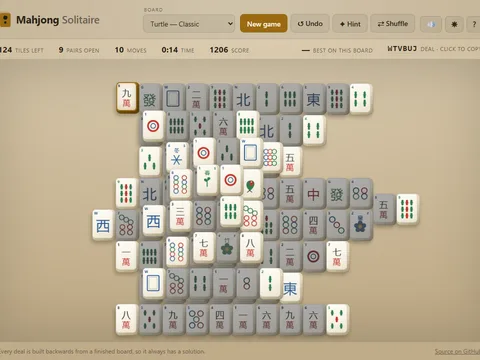
Mahjong Solitaire unblocked is a calm tile puzzle where you clear a stacked board one pair at a time. Only free tiles can be taken, so the order you choose matters far more than how fast you click. Classroom 7x serves it from its own servers, so it opens in Chrome on a Chromebook with no sign-up.
About Mahjong Solitaire
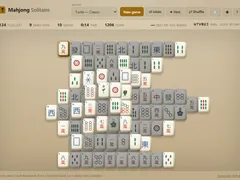
This solitaire game by CTBot000 uses a full set of 144 mahjong tiles stacked in layers. Alongside three numbered suits (circles, bamboo and characters), the set has four flowers, four seasons, three dragons and four winds. Most tiles need an exact twin. Flowers and seasons are looser, because any flower pairs with any flower and any season with any season. You can spot those tiles by the small F or S printed in a corner.
Six board layouts are available. The easiest is a gentle two-layer shape, and the hardest is an expert spread that starts with only a few open tiles. Every deal is built by taking a full board apart in pairs and then rebuilding it, so a solution always exists. Each pair scores 100 points, with a bonus for quick finds. Hints, undo and shuffles cost points. When no moves remain, you can accept a shuffle that leaves the board still solvable.
How to Play Mahjong Solitaire
- Choose one of the six layouts from the menu and take a moment to look over the stack.
- Find free tiles, meaning nothing sits on top and either the left or right side is open.
- Pick any free tile, then click another free tile showing the same face, and the pair disappears.
- Use Hint, Undo or Shuffle when needed, keeping in mind that each one costs points.
- Keep matching until the board is empty to earn a time bonus and set a best time.
Mahjong Solitaire Controls
| Input | Action |
|---|---|
| Click a free tile, then its match | Remove a pair |
| Click the same tile again or Esc | Put the selected tile back |
| H or Hint button | Show a pair you can take |
| Z or Undo button | Undo the last pair |
| S or Shuffle button | Reshuffle the tiles left on the board |
| N or New game button | Start a new deal |
| Tab, arrow keys, Enter or Space | Pick tiles with the keyboard |
| Tap a tile, then its match (touch) | Remove a pair on touch screens |
How to Play Mahjong Solitaire on PC & Chromebook
Mahjong Solitaire works nicely on a Chromebook or laptop, where the wide boards have plenty of room. Most players click tiles with a mouse or trackpad, but there is also a full set of keyboard shortcuts. H shows a hint, Z undoes a pair, S shuffles and N starts a new deal. You can even Tab into the board and choose tiles with the arrow keys.
- Choose a layout from the menu.
- Click a free tile, then click its matching partner.
- Press H for a hint or Z to undo a pair.
- Press S to shuffle or N to start a new deal.
Desktop tip: Use fullscreen on smaller laptop screens. The board shrinks to fit the window, and bigger tiles make similar faces easier to tell apart.
How to Play Mahjong Solitaire on Mobile
Mahjong Solitaire can be played on a phone or tablet by tapping a tile and then its match. Because the board scales down to fit the screen, the tiles in wide layouts get quite small on a phone, and similar faces become hard to tell apart. Tablets handle it well. On a phone, rotate to landscape and switch to fullscreen so each tile gets more room.
- Turn your device sideways and pick a layout.
- Tap a free tile, then tap the tile that matches it.
- Tap Hint if you cannot find a pair.
- Tap Shuffle or Undo when the board gets stuck.
Mobile tip: Use fullscreen instead of pinch zoom. Pinching can shift the board around, while fullscreen keeps the whole layout in view at a larger size.
Tips and Tricks
- Clear long rows starting at the ends and working inward. A tile in the middle stays locked until one of its side neighbors has been removed.
- Open up tall stacks early. Anything under the top layers holds back many other tiles, so pairs that expose them are usually your best picks.
- When three copies of the same face are free, pick the two that open up more tiles. The leftover copy can wait.
- Flowers and seasons match any tile in their own group. Save them as spare moves for later, when the board gets tight.
- Beginners do best on Terraces. That layout offers more open pairs at the start than any other, so it is a friendly place to learn.
Game Info
| Game | Mahjong Solitaire |
|---|---|
| Developer | CTBot000 |
| Genre | Puzzle |
| Players | Single player |
| Works on | Chromebook, PC and Mac (touch screens work, mouse is more precise) |
| Price | Free, no sign-up |
| Hosting | Served from Classroom 7x's own servers |
| License | MIT (original source, license, credits) |
Mahjong Solitaire FAQ
Can every board be solved?
Yes. To build a deal, the game removes free tiles from a full layout two at a time, then places those pairs back in the opposite order. So a solution always exists, though a careless order of matches can still trap you.
What happens if I run out of moves?
A panel pops up to say no moves are left. From there you can reshuffle the remaining tiles into a layout that is still solvable, take back your last pair, or begin a brand-new deal.
Do hints and undo affect my score?
Yes. Every pair is worth 100 points, but a hint costs 30, an undo costs 120 and a shuffle costs 150. Finding pairs quickly earns small bonuses, and a fast clear adds a time bonus.