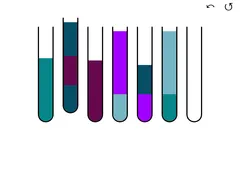
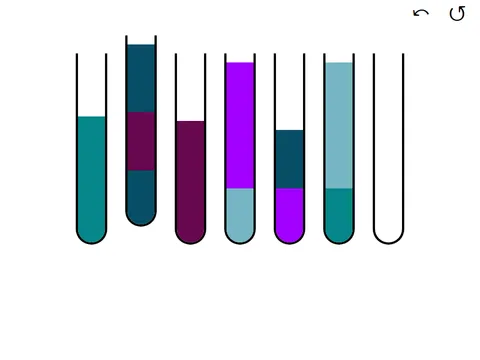
A row of glass tubes, a jumble of colored liquid and a little free space are all you start with. Color Pour Sort unblocked asks you to pour until every tube holds a single color. Levels never run out, and each one grows a bit trickier. You can play it on Classroom 7x in Chrome, with no download and no sign-up.
About Color Pour Sort
Color Pour Sort is based on Be like water, an open-source puzzle by Gedas-S. The look is clean and simple, with tubes and liquid drawn by the browser. One detail makes it different from many sorting puzzles: the color bands are not all the same size. Some layers are thin while others are thick. When you pour, only the amount the target tube has room for moves across, and whatever does not fit stays in the tube you poured from.
Level 1 starts with two colors and four tubes. As the level number rises, more colors appear, so later boards have more tubes and lots of thin layers. A tube filled to the brim with one color gets a black cap and locks. Clear the board and the next level slides in. The menu offers dark mode, smaller tubes, animation speed, three level generators and a box to jump to any level. Progress is saved in your browser.
How to Play Color Pour Sort
- Click or tap a tube to lift it, which shows that it is ready to pour.
- Choose a second tube that is empty or has the same color on top, and the liquid pours across.
- Watch how much moves, since a pour stops when the target tube is full and leaves the rest behind.
- Fill a tube to the top with one color to cap and lock it in place.
- Finish the level when every tube is either capped or completely empty.
Color Pour Sort Controls
| Input | Action |
|---|---|
| Click a tube | Lift it to pour |
| Click a second tube | Pour the top color into it |
| Curved arrow (top right) | Undo the last pour |
| Circular arrow | Restart the current level |
| Three-line menu icon | Open settings and level options |
| Tap (touch screens) | Tap a tube, then tap where it should pour |
How to Play Color Pour Sort on PC & Chromebook
On a Chromebook or laptop, Color Pour Sort is a calm click-to-pour puzzle. Click one tube to lift it, then click the tube you want to pour into. The undo and restart buttons sit at the top of the screen, and the menu holds settings like dark mode and animation speed. The tubes shrink automatically so the whole level stays in view.
- Open the game and look over the tubes before your first move.
- Click a tube to lift it, then click a target tube to pour.
- Click the curved arrow to undo a pour that did not work.
- Open the menu to change settings or jump to another level.
Desktop tip: Speed up or switch off the pour animation in the menu if you want to move through levels more quickly.
How to Play Color Pour Sort on Mobile
Color Pour Sort works well on phones and tablets. Every move is a pair of taps, so there is no dragging or tricky timing. The tubes resize to fit your screen, and the undo and restart buttons stay within reach at the top. Your level and the current state of the tubes are saved in the browser, so you can stop at any time.
- Open the game in your phone or tablet browser.
- Tap a tube to lift it, then tap the tube you want to fill.
- Tap the curved arrow to undo, or the circular arrow to restart.
Mobile tip: On later levels with many tubes, try turning your phone sideways to give the row of tubes more room.
Tips and Tricks
- Protect your empty tube. It is the only place a color can go when nothing else matches, so fill it only when you have a plan.
- Check the free space before every pour. A pour that only half fits leaves a thin leftover that can bury the color beneath it.
- Aim to cap one tube early in each level. A finished, locked tube clears clutter and makes the remaining choices easier to see.
- Use undo whenever a plan stalls. Every pour can be rewound one step at a time, and trying ideas costs you nothing.
- If you restart by mistake, press restart again before pouring. Doing that returns the tubes to the state they were in before that first restart.
Game Info
| Game | Color Pour Sort |
|---|---|
| Developer | Gedas-S |
| Genre | Puzzle |
| Players | Single player |
| Works on | Chromebook, PC, Mac, tablet and phone |
| Price | Free, no sign-up |
| Hosting | Served from Classroom 7x's own servers |
| License | AGPL-3.0 (original source, license, credits) |
Color Pour Sort FAQ
Why does only part of the color pour across?
The target tube has limited space. The game moves as much of the top color as will fit and leaves the rest in the original tube. Layers have different heights, so look at the gap before you pour.
How do I replay an earlier level?
Open the menu and enter a number in the current level box. Each level number builds one fixed layout for a given generator, so as long as you keep the same generator, you can go back to a favorite puzzle whenever you like.
Why can I not select a capped tube?
A black cap means the tube is full of one color and finished. The game locks it so you cannot pour out of it or into it by accident.