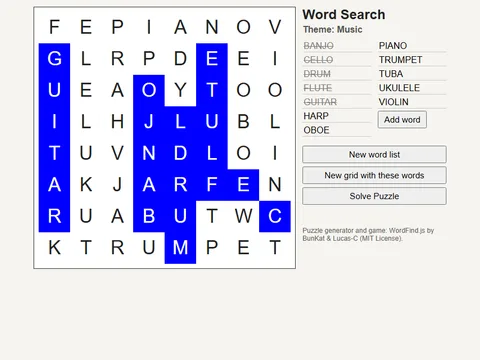
Twelve words are hiding in a square of letters, and some of them are spelled backward. Word Search unblocked is a relaxed puzzle with no timer, so you can hunt at your own pace. Classroom 7x serves it from its own servers, which means it loads in Chrome on a Chromebook with no download and no account.
About Word Search
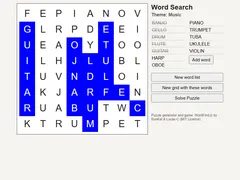
This puzzle runs on WordFind.js, an open-source word search generator. Bill of BunKat LLC created it, and Lucas-C later added to it. Every round gives you twelve words to find and a grid of letters to search. Each word follows a straight line, but the direction can be forward, backward, up, down or diagonal. Words may also cross and share letters. When you find one, its letters turn blue and the word is crossed off.
When the page opens, it picks one of seven themed lists, such as Animals, Music or Ocean. A New word list button moves to the next theme, and another button mixes the current words into a fresh grid. You can also type your own words into the list to build a custom puzzle, which works well for spelling or vocabulary practice. If you get stuck, Solve Puzzle highlights every word you have not found yet.
How to Play Word Search
- Pick a word from the list, then look through the grid for its first letter.
- Press on that first letter and drag straight across the grid to the last letter, then let go.
- Check the list, where a correct word gets crossed off and its letters turn blue in the grid.
- Keep searching in every direction, including backward and diagonal, until all twelve words are found.
- Press New word list for another theme, or type your own words and make a new grid.
Word Search Controls
| Input | Action |
|---|---|
| Mouse press and drag | Select a word from first letter to last |
| Touch and slide | Select a word on a touch screen |
| New word list button | Switch to the next themed list |
| New grid with these words button | Make a fresh grid from the current words |
| Keyboard typing / Add word button | Change words or add extra ones |
| Solve Puzzle button | Reveal the words you have not found |
How to Play Word Search on PC & Chromebook
Word Search works smoothly with a mouse or trackpad on a laptop, desktop or Chromebook. You press on the first letter of a word and drag to the last one. The keyboard comes in handy when you want to type your own word list, such as this week's spelling words, and turn it into a brand new puzzle in a couple of clicks.
- Read the word list next to the grid.
- Press on a word's first letter and drag straight to its last letter.
- Let go and check that the word is crossed off.
- Use New word list or type your own words for another puzzle.
Desktop tip: Drag slowly along diagonals. Moving the pointer straight through the center of each letter keeps the selection on track.
How to Play Word Search on Mobile
Word Search is comfortable to play with a finger on a phone or tablet. You touch the first letter of a word and slide to the last one, the same motion you would make with a mouse. Narrow screens put the grid on top and the word list underneath, with the grid sized down to the screen width, so you can scroll down to check which words are left.
- Hold your phone upright so the grid fills the screen width.
- Touch the first letter of a word and slide to its last letter.
- Scroll down to the word list to see which words remain.
Mobile tip: Rest your finger lightly as you slide. Pressing hard can make the page scroll instead of selecting letters.
Tips and Tricks
- Look for Q, X or Z in the grid. The random filler letters never use them, so any you spot belong to a hidden word.
- Find the longest word first. The grid starts out as wide as that word, so it usually fills a full row, column or diagonal.
- Stuck on a word's first letter? Look for its last letter instead and read the line backward.
- Watch the orange highlight as you drag. It stops growing as soon as you leave the path of every remaining word.
- Check around words you already found. Words often cross each other, so a found word is a good clue for the next.
Game Info
| Game | Word Search |
|---|---|
| Developer | Bill (BunKat LLC) and Lucas-C |
| Genre | Learning, Puzzle |
| Players | Single player |
| Works on | Chromebook, PC, Mac, tablet and phone |
| Price | Free, no sign-up |
| Hosting | Served from Classroom 7x's own servers |
| License | MIT (original source, license, credits) |
Word Search FAQ
Which directions can words go?
Any of eight. Besides reading forward and backward, a word can go straight up, straight down, or follow one of the four diagonals. Words can also cross each other and share a letter.
Can I make a puzzle with my own words?
Yes. Replace the words in the list with your own, press Add word if you need more boxes, then press New grid with these words. The game places all of them and makes the grid bigger when space runs short.
Is there a time limit?
No. Nothing is timed or scored, so you can go at whatever pace you like. When you find all twelve words, the grid turns green and shows a message that every word was found.