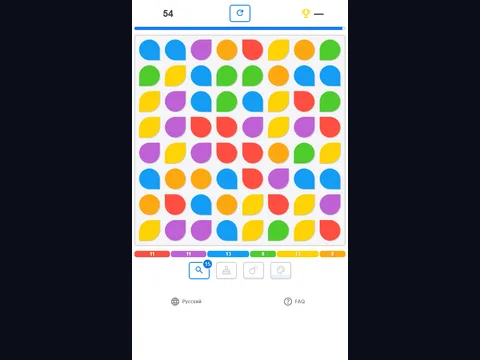
Color Tile Match unblocked is a timed swapping puzzle with six colors of rounded tiles on an 8x8 board. Trade two neighbors to make a line of three or more, and that line clears away. Every match also adds time back to a shrinking bar. Classroom 7x hosts the game itself, so it loads in Chrome with no download or sign-up.
About Color Tile Match
Alexander Bazhanov made this version, building on an open-source canvas tutorial by Rembound. You can swap any tile with one of the four tiles touching its sides. Get three or more of one color in a line, either across or down, and they disappear. Everything above them falls to fill the space, and fresh tiles drop in at the top. If a swap does not create a line, the tiles just slide back, so a wrong guess does not cost you anything.
Points for a line equal its length times itself, so three tiles give 9 points, four give 16 and five give 25. A round begins with a two-minute timer that drains every second, and a bit faster as your score grows. Scoring pushes it back up, but never past full. You also earn three boosters by score: a wild palette tile, a bomb and a color brush. Your best score stays saved in the browser.
How to Play Color Tile Match
- Click or tap any tile, and then choose a tile right next to it, above, below or beside, to trade places.
- Clear tiles by lining up at least three of the same color, either across or down.
- Keep matching quickly, because each score pushes the timer bar back up and buys you more time.
- Select a tile and press the brush, bomb or palette button to use a booster you have earned.
- Tap the magnifier when you are stuck to highlight a move you can make right now.
Color Tile Match Controls
| Input | Action |
|---|---|
| Click a tile, then a neighbor | Swap two tiles |
| Drag a tile onto a neighbor | Swap two tiles in one motion |
| Tap or slide (touch screens) | Swap tiles on phones and tablets |
| Magnifier button | Highlight a possible move |
| Brush, bomb or palette button | Apply a booster to the chosen tile |
| Circular arrow button | Start a new game |
How to Play Color Tile Match on PC & Chromebook
Color Tile Match runs nicely in a browser window on a Chromebook or laptop, even though it was designed with phones in mind. Click a tile and then a neighbor to swap them, or drag one tile straight onto the next. The board sits in a tall, narrow column in the middle of the page. Clicking FAQ shows the rules and pauses the timer.
- Click the circular arrow button to start a fresh round.
- Click a tile, then click a touching tile to swap them, or drag one onto the other.
- To use a booster, pick a tile first and then press its button: brush, bomb or palette.
- Click FAQ any time you want to read the rules with the timer paused.
Desktop tip: Drag instead of clicking twice when the timer is low. One smooth drag makes a swap faster than two separate clicks.
How to Play Color Tile Match on Mobile
Color Tile Match was built mobile first, so it is very comfortable on a phone. Hold the phone upright, since the tall layout matches a portrait screen. Tap a tile and then a neighbor, or slide one tile onto another, to swap them. Boosters and the magnifier hint work with a tap, too, so you never need a keyboard or mouse.
- Hold your phone upright so the full board fits the screen.
- Slide a tile onto a neighbor, or tap one tile and then another, to swap.
- Tap the magnifier if you cannot spot a match.
- Tap FAQ to read the rules, which also pauses the timer.
Mobile tip: Use slides for quick swaps and taps for careful ones. Tapping lets you check the tile you picked before you commit to the move.
Tips and Tricks
- Make matches near the bottom of the board when you can. Falling tiles above often line up on their own and clear for free.
- Hunt for lines of four and five. A five-tile line scores almost three times as much as three tiles and refills more time.
- Check the color counts in the strip under the board, then use the brush on whichever color has the highest number.
- Place the wild palette tile where two near-lines of different colors meet. It counts as any color, so it can finish both.
- Keep an eye on the number badge on the magnifier. It shows how many moves exist, so a low count warns you a dead end is close.
Game Info
| Game | Color Tile Match |
|---|---|
| Developer | Alexander Bazhanov |
| Genre | Puzzle |
| Players | Single player |
| Works on | Chromebook, PC, Mac, tablet and phone |
| Price | Free, no sign-up |
| Hosting | Served from Classroom 7x's own servers |
| License | MIT (original source, license, credits) |
Color Tile Match FAQ
How do I get boosters?
Boosters come from your score. Every 250 points earns a palette wild tile, every 500 earns a bomb, and every 1,000 earns a brush. A bar inside each button fills up to show how close the next one is.
When does a round end?
The round ends when the timer bar runs empty or when no swap on the board can make a match. Stuck for ideas? Wait around 15 seconds without moving and the game will highlight a possible swap.
What does the bomb do?
The bomb clears the tile you selected along with every tile around it. It is handy for breaking up a crowded board that has run out of easy matches, and it can open up new chains.