A pear, a croissant, a chili pepper, and somewhere on the board, each one has a twin. Memory Pairs unblocked is a calm card-matching game that tests how well you remember what you have already seen. Classroom 7x serves it from its own servers, so it opens in Chrome on a Chromebook without a download or an account.
About Memory Pairs
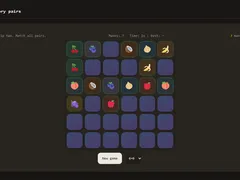
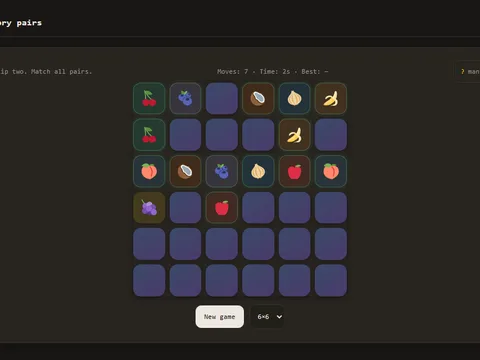
Memory Pairs is part of an open-source set of small browser games made by Tejas Wavde. It has a dark, simple look, and every card hides a food picture drawn with Twemoji emoji art. Every picture is printed on exactly two cards. You reveal two cards per turn. A matching pair stays face up, marked with a colored tint and a green border. A pair that does not match turns back over after a short pause, so you need to remember their spots.
You can play on three board sizes. The 4x4 board holds 8 pairs, the 6x6 holds 18, and the 8x8 holds 32, which uses every food picture in the set. Every two flips add one to your move count. The clock starts on your first flip and stops when the last pair is matched. Your fastest time for each board size is saved in your browser, so a quick small board never replaces your big-board record.
How to Play Memory Pairs
- Choose 4x4, 6x6 or 8x8 from the menu below the board to start a fresh shuffled game.
- Click or tap any card to turn it over, then pick a second card to see if they match.
- Leave matched pairs face up, and try to remember the pictures on cards that flip back down.
- Use what you remember to find each picture's partner with as few moves as you can.
- Match every pair to stop the clock, then check your moves and time against your best.
Memory Pairs Controls
| Input | Action |
|---|---|
| Click / tap a card | Flip it over |
| Tab, then Enter or Space | Move to a card and flip it with the keyboard |
| New game button | Reshuffle the current board size |
| Size menu | Switch between 4x4, 6x6 and 8x8 |
| ? man button / Esc or Q | Open or close the help window |
How to Play Memory Pairs on PC & Chromebook
Memory Pairs is easy to play on a laptop, desktop or Chromebook with a mouse or trackpad. Just click cards to flip them. If you prefer the keyboard, Tab moves between cards and Enter or Space flips them. On a big screen, the 8x8 board has plenty of room, so it is a good place to try the largest challenge with all 32 pairs.
- Pick a board size from the menu below the cards.
- Click one card, then a second, and watch whether they match.
- Keep flipping and matching until every pair is face up.
- Click New game to reshuffle and try to beat your best time.
Desktop tip: Say the picture names quietly in your head as you flip them, like pear in the top corner. It helps them stick.
How to Play Memory Pairs on Mobile
Memory Pairs plays smoothly on phones and tablets, because every move is a single tap on a card. The board shrinks to fit your screen, whichever way you hold it. On a small phone the 4x4 size gives you the biggest cards, which are the easiest to tap. Larger boards are better saved for a tablet or a computer.
- Open the size menu and pick 4x4 for a phone or a larger size on a tablet.
- Tap a card to flip it, then tap another to try for a match.
- Keep going until all pairs are face up and the clock stops.
Mobile tip: Wait for unmatched cards to flip back before tapping again. The game ignores taps until they turn over.
Tips and Tricks
- Spend your early moves flipping cards you have never seen. Every new card adds one more picture to your mental map of the board.
- Move across the board in rows instead of jumping around. Positions are much easier to remember when you explore in order.
- When the first card you turn shows a picture you have seen before, use your second flip on its partner right away.
- Notice the background tint on each pair. The colors can help you recall where a picture was when you only saw it briefly.
- Decide on one goal before each round. Trying for the fastest time and the fewest moves at once often leads to rushed guesses.
Game Info
| Game | Memory Pairs |
|---|---|
| Developer | Tejas Wavde |
| Genre | Puzzle |
| Players | Single player |
| Works on | Chromebook, PC, Mac, tablet and phone |
| Price | Free, no sign-up |
| Hosting | Served from Classroom 7x's own servers |
| License | MIT (original source, license, credits) |
Memory Pairs FAQ
When does the timer start?
Nothing starts timing until your first card is flipped, so you can study the board for as long as you want. The clock halts the moment the final pair is matched, and your time shows at the top.
Where do the pictures come from?
The food pictures are Twemoji emoji art, shared under the CC-BY 4.0 license by Twitter, Inc. and contributors. A round draws its pictures randomly from 32 foods, so boards differ between games.
Can I play with only the keyboard?
Yes. Press Tab to move from card to card and Enter or Space to flip the one that is highlighted. It is slower than clicking, but every card on the board can be reached this way.