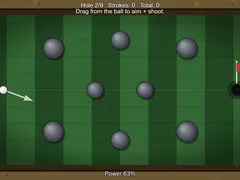
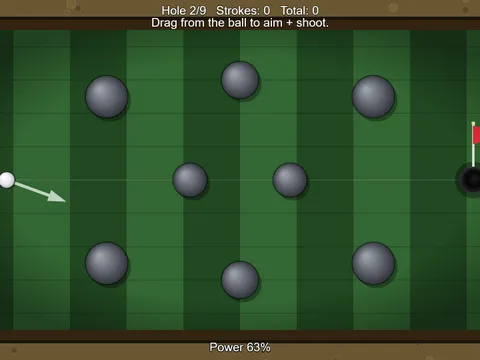
Mini Putt Park unblocked is a relaxed mini golf course seen from above, with nine holes to master. Every green has its own arrangement of walls and obstacles, and on each hole you try to sink the ball in as few strokes as you can. You can play it on Classroom 7x right in Chrome, without downloading anything or creating an account.
About Mini Putt Park
Frank Force built this course, first called Mini Golf, with his LittleJS engine and Box2D physics. Every hole is designed by hand around one idea. One is crowded with round stone bumpers, another wraps around an L-shaped wall, and the final hole has a striped gate sliding up and down across your path. The ball rolls, slows and bounces in a believable way, and the top of the screen tracks your strokes on the hole and your overall total.
On the course map, all nine holes appear as small live previews, so you can begin anywhere or practice one tricky green. The ball travels in whatever direction you drag, which feels natural after a putt or two. When the ball sits still, a faint guide line aims toward the cup to help you line up. Finishing hole 9 sends you back around to hole 1, so you can keep working to lower your total.
How to Play Mini Putt Park
- Pick a hole on the course map by clicking its preview or pressing a number key from 1 to 9.
- Press on the ball and drag toward the cup or toward a wall you want to bounce off.
- Watch the arrow and the power reading grow, then release to putt.
- Use softer putts near the cup, because a fast ball can roll right over it.
- Sink the ball to load the next hole, or press R to replay the current one.
Mini Putt Park Controls
| Input | Action |
|---|---|
| Click a hole preview / 1 to 9 | Choose a hole on the course map |
| Click and drag the ball | Aim and set power |
| Release the mouse button | Putt |
| R | Replay the current hole |
| N | Skip to the next hole |
| Esc / menu icon | Back to the course map |
| Tap a hole preview | Choose a hole on a touch screen |
| Touch, drag and lift | Aim and putt on a touch screen |
How to Play Mini Putt Park on PC & Chromebook
On a computer, Mini Putt Park uses a simple click-and-drag putt plus a few handy keys. The number keys 1 through 9 jump straight to any hole, R restarts the one you are on, and N skips ahead. A mouse gives the finest control over power, but a trackpad works too if you drag slowly and steadily.
- Click a hole preview on the course map, or press its number key.
- Press on the ball and drag toward your target, watching the power reading.
- Let go to putt, then wait for the ball to stop before the next stroke.
- Press R to retry a hole, N to skip it, or Esc to go back to the map.
Desktop tip: Check the faint line from the ball to the cup before each putt. It shows the direct route, which helps you decide whether to bank off a wall.
How to Play Mini Putt Park on Mobile
Mini Putt Park plays nicely on phones and tablets as long as the screen is sideways. Every putt is a drag and a release, so your finger replaces the mouse. Tap any hole on the course map to start there. The keyboard shortcuts are not available on touch, but the menu icon still brings you back to the map.
- Rotate your device to landscape and tap a hole on the course map.
- Touch the ball and slide your finger toward where it should roll.
- Lift your finger to putt.
- Tap the menu icon in the top right to return to the course map.
Mobile tip: Your finger can hide the ball while you aim. Start on the ball, then slide well outward so the arrow and power reading stay visible.
Tips and Tricks
- The outer frame is bouncy. When planks block the straight line, aim at a wall and let the ball bank around the obstacle.
- On the stone bumper hole, pick a gap and use medium power. Hard shots ricochet wildly between the stones.
- From long range, try to stop the ball near the cup rather than sinking it in one hit. A slow ball drops in, while a fast one skips over.
- On hole 9, watch the striped gate move a couple of times before you putt, then time your shot to reach the middle as it opens.
- Use the course map to drill your worst hole. Replaying one green a few times teaches you the right power quickly.
Game Info
| Game | Mini Putt Park |
|---|---|
| Developer | Frank Force |
| Genre | Sports |
| Players | Single player |
| Works on | Chromebook, PC, Mac, tablet and phone |
| Price | Free, no sign-up |
| Hosting | Served from Classroom 7x's own servers |
| License | MIT (original source, license, credits) |
Mini Putt Park FAQ
Why does the ball go the way I drag?
This game uses direct aiming. You pull toward your target, and the ball heads that way when you let go. A very short drag below about 5% power cancels the putt so you can try again.
Does pressing R reset my total score?
No. Pressing R returns the ball to the tee and resets that hole's stroke count, yet any strokes already taken remain in your running total. To begin a fresh total, pick a hole on the course map.
Can I play on a phone?
Yes, but turn the phone sideways first. In portrait mode the game will ask you to rotate it. To putt, place a finger on the ball, pull toward the spot you are aiming for, and release.