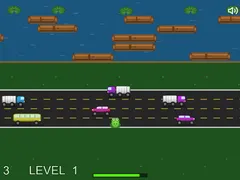
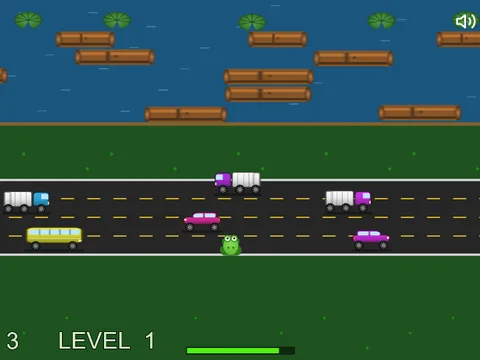
Hop Across unblocked is an arcade game played on a grid, where your goal is to guide a small frog safely to the far side. A busy highway comes first, followed by a river where floating logs are the only safe footing. Each press moves the frog exactly one square. Classroom 7x hosts it on its own servers, so it starts in Chrome without a download.
About Hop Across
Frank Force first released this game as Froggit in his open-source LittleJS Arcade. Every piece of art, from the frog to the cars and logs, is drawn in code. Your frog begins on the bottom bank. First you weave across the road while avoiding every vehicle, then pause on a grass strip before jumping onto the logs. Frogs in this game cannot swim, so landing in open water costs you a life.
Five lily pads sit along the top row, swaying back and forth. Reach an empty pad to bring a frog home, and fill every pad to finish the level. Later levels add more lanes, shuffle their directions and raise the speed, and the crossing timer drops from 22 seconds down toward 8. You score points for each new row reached, every frog brought home, leftover time and a 1,000-point bonus per level.
How to Play Hop Across
- Click Play, or press Enter twice, to start with your frog waiting on the bottom bank.
- Press an arrow key or W A S D to hop exactly one square in that direction.
- Cross the road between cars, then stop on the middle grass strip to plan your river crossing.
- Jump from log to log across the river, and never hop into the open water.
- Land on an empty lily pad at the top to bring a frog home, and fill all five.
Hop Across Controls
| Input | Action |
|---|---|
| Arrow keys / W A S D | Hop one square per press |
| Click beside the frog | Hop toward the side you clicked |
| On-screen direction pad (touch) | Hop on phones and tablets |
| Enter | Highlight Play, then press again to start |
| Escape or the menu icon | Pause, restart or quit |
How to Play Hop Across on PC & Chromebook
Hop Across is quick to pick up on a laptop or Chromebook. The frog moves exactly one square for each press of an arrow key or a W A S D key, so short taps work better than holding a key down. Clicking beside the frog also hops it in that direction. A connected game controller works as well.
- Click Play, or press Enter to highlight it and Enter again.
- Tap the arrow keys or W A S D to hop one square at a time.
- Pause on the middle grass to line up your path across the river.
- Press Escape to pause, restart or quit the run.
Desktop tip: Count the hops you need before starting a river crossing. Knowing the exact number keeps you from tapping one time too many and landing in the water.
How to Play Hop Across on Mobile
Hop Across includes an on-screen direction pad, so it works on phones and tablets. After you tap Play, touch the screen and the pad appears in the lower right corner. Each press moves the frog one square, just like a key press. Turning your phone sideways gives the road and the river much more room.
- Turn your phone sideways for the widest view of the road and river.
- Tap Play to start a new game.
- Touch the screen to show the direction pad, then press an arrow to hop.
- Pause with the menu icon up in the top corner of the screen.
Mobile tip: Press the direction pad with short, separate taps. Keeping your thumb resting on the pad between hops helps you react fast when a gap opens.
Tips and Tricks
- Use the quiet moment before your first hop. The timer does not start until the frog moves, so read the traffic first.
- Watch a lane's rhythm instead of single cars. Every vehicle in one lane shares the same speed and spacing, so the gaps repeat.
- Step sideways along a log to stay away from the screen edge. Riding a log off the side costs you a life.
- Choose your lily pad before you reach the top log. A pad that already holds a frog is just as deadly as the water.
- Watch for the bonus fly. Bringing a frog home to the pad it is sitting on gives you 200 extra points.
Game Info
| Game | Hop Across |
|---|---|
| Developer | Frank Force |
| Genre | Arcade, Skill |
| Players | Single player |
| Works on | Chromebook, PC, Mac, tablet and phone |
| Price | Free, no sign-up |
| Hosting | Served from Classroom 7x's own servers |
| License | MIT (original source, license, credits) |
Hop Across FAQ
Why did my frog vanish at the top?
Frogs are only accepted on the far bank if they land on a free lily pad. Jumping into a gap between pads, or onto a pad that is already taken, costs a life. Line up with an open pad before hopping.
When does the timer bar start?
Each new frog's crossing time starts counting down on the green bar once it takes its first hop. During the final three seconds you hear a tick, and you lose a life if the bar runs out.
Does it save my high score?
Yes. Your high score and the best level you have reached are stored in your browser, so they will still be there next time you play on the same device and browser.