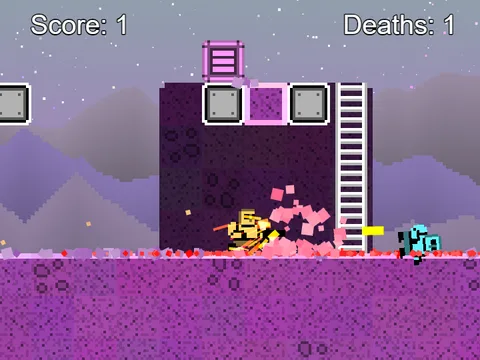
Purple rock, wooden crates, ladders and hopping creatures fill the single wide map of Little Platformer unblocked. You carry a gun and a supply of grenades, and most of the walls around you can be shot or blown apart. Collect coins, clear enemies and stay alive. Classroom 7x hosts it directly, so it runs in Chrome without downloading anything.
About Little Platformer
Little Platformer began as the platformer example included with LittleJS, an open-source game engine by Frank Force. It was made to show what the engine can do, so it is packed with physics, particles and breakable terrain. Each bullet knocks out a single tile of rock, but the gray metal blocks cannot be broken at all. A grenade beeps for three seconds before it explodes and carves a round hole, which is great for digging shortcuts.
Scattered across the map are 66 coins and 12 enemies, and you earn a point for each coin grabbed or enemy defeated. Enemies take five hits, and so do crates. Contact with an enemy or a grenade explosion knocks you out at once. When that happens, you respawn at the start, but your score and every change you made to the level stay. There is no finish line. The challenge is to clear everything with as few deaths as possible, which the game counts on screen.
How to Play Little Platformer
- Move with the arrow keys or W A S D, and climb ladders by pressing up or down.
- Jump with Up or W, holding it longer to leap higher, and slide down walls to kick off them.
- Press Z or hold the left mouse button to shoot enemies, crates and breakable rock.
- Throw a grenade with C, then step back before it goes off three seconds later.
- Use a dodge roll with X to stay safe for a moment when an enemy lands nearby.
Little Platformer Controls
| Input | Action |
|---|---|
| Arrow keys or W / A / S / D | Run and climb ladders |
| Up arrow or W | Jump (hold for a higher jump) |
| Z or left mouse button | Shoot |
| X or right mouse button | Dodge roll |
| C or middle mouse button | Throw a grenade |
| Mouse wheel / R | Zoom the camera / restart the level |
| On-screen stick and buttons (touch) | Move, jump, shoot, roll and throw on a touch screen |
How to Play Little Platformer on PC & Chromebook
On a Chromebook or laptop, Little Platformer works with keys alone or with keys plus a mouse. Arrow keys or W A S D move you, Z shoots, X rolls and C throws a grenade. If you have a mouse, its three buttons handle shooting, rolling and grenades, and the wheel zooms the camera. Press R any time you want to restart the level from scratch.
- Open the game and click once on the level.
- Move and jump with the arrow keys or W A S D.
- Shoot with Z, roll with X and throw grenades with C.
- Scroll the mouse wheel to zoom, or press R to restart.
Desktop tip: On a touchpad, stick to the keyboard controls. Middle and right clicks are awkward on most Chromebook touchpads.
How to Play Little Platformer on Mobile
Little Platformer adds touch controls when you open it on a phone or tablet. A stick on the left side moves your character, and four buttons on the right handle jumping, shooting, rolling and grenades. The level is wide, so holding your device sideways gives you the best view. It is fully playable this way, though precise jumps take some practice.
- Open the game and turn your phone or tablet to landscape.
- Use the left stick to run and climb ladders.
- Tap the right-side buttons to jump, shoot, roll or throw grenades.
- Keep exploring to find coins and clear out enemies.
Mobile tip: Rest your left thumb on the stick at all times, and use your right thumb for the buttons so you never stop moving.
Tips and Tricks
- Start shooting while enemies are still a few steps away. They need five hits, so waiting until they are close gives them time to reach you.
- Use grenades as digging tools. A well-placed blast can open a direct path to coins tucked inside solid rock.
- Throw a grenade and move away right after. Three seconds is plenty of time, but the blast can still knock you out if you stay.
- Roll through enemies that block a narrow path. You are protected during the roll, but you must wait two seconds before rolling again.
- Scroll the mouse wheel to zoom out and look for coins you missed, especially ones hidden behind walls you have not broken yet.
Game Info
| Game | Little Platformer |
|---|---|
| Developer | Frank Force |
| Genre | Action |
| Players | Single player |
| Works on | Chromebook, PC, Mac, tablet and phone |
| Price | Free, no sign-up |
| Hosting | Served from Classroom 7x's own servers |
| License | MIT (original source, license, credits) |
Little Platformer FAQ
What is the highest score I can get?
There are 66 coins and 12 enemies on the map, each worth one point, so a complete run reaches 78. The counter for deaths sits on the right side of the screen if you want a cleaner run.
Do the holes I make stay in the level?
Yes. Rock you destroy stays gone even after you get knocked out and return to the start. You can use that to carve safer routes on your next attempt.
Are there any hidden keys like T, E, B or M?
Yes, they are sandbox tools the author left in. T drops a crate at your mouse pointer, E adds an enemy, B sets off an explosion, and M teleports your character to wherever the pointer is.