River Strike unblocked is a scrolling jet shooter set over a long, twisting river. Your plane flies forward on its own while you steer, shoot and control your speed. The real danger is the fuel gauge, which drains every second. You can play it on Classroom 7x in Chrome, straight from the site with no download.
About River Strike
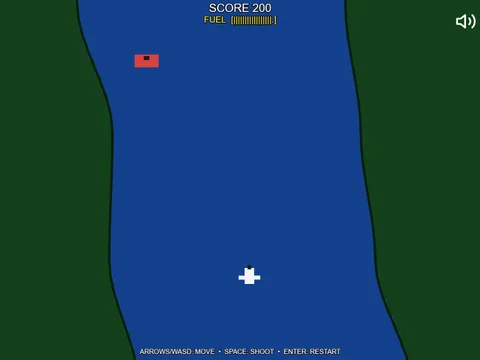
River Strike is one of the games Frank Force created for his open-source LittleJS Arcade. The graphics use clean, flat shapes, so it is easy to spot what matters. Red boats cruise over the river, dark green blocks poke out from the riverbanks and yellow fuel depots drift on the current. Each run creates a fresh river from a random seed, which means the bends and targets differ every game, and no two flights match.
Shooting a boat earns 50 points, while shooting an obstacle earns 25. Flying into either one crashes your jet, and so does touching the riverbank. Depots are different: flying through one is safe, refills almost half your tank and adds 100 points. Shooting a depot pays the same 100 points but gives you no fuel at all. Flying faster also burns through fuel more quickly, so speed always comes at a cost.
How to Play River Strike
- Start a run and let the jet fly forward on its own above the river.
- Steer left and right with the arrow keys or A and D to stay over the water.
- Hold Up or W to speed up and Down or S to slow down, then let go to cruise.
- Hold Space to fire at boats and obstacles before they reach your jet.
- Fly straight through yellow fuel depots whenever your fuel bar starts getting low.
- After a crash or an empty tank, press Enter to begin a new river.
River Strike Controls
| Input | Action |
|---|---|
| Left / Right arrows or A / D | Steer |
| Up / Down arrows or W / S | Speed up or slow down |
| Space (hold) | Fire |
| Enter | Restart the run |
| Esc or menu icon | Pause |
| Left stick (touch) | Steer and change speed |
| Lower right button (touch) | Fire, or restart after a crash |
How to Play River Strike on PC & Chromebook
River Strike plays great on a Chromebook or laptop keyboard. One hand steers and controls speed with the arrow keys or W, A, S and D, while the other holds Space to keep firing. Enter starts a new run after a crash, and Esc pauses. A gamepad works too if you have one connected. The view is wide, so it fills a laptop screen nicely.
- Start the game and let the jet take off upriver.
- Steer with the arrow keys or A and D.
- Hold Space to fire and use Up or Down to change speed.
- Press Enter to restart after a crash or an empty tank.
Desktop tip: Steer with W, A, S and D and keep your right thumb on Space. That split keeps both hands busy without crossing over.
How to Play River Strike on Mobile
River Strike has full touch controls for phones and tablets. They show up after your first touch, with a virtual stick on the left side of the screen and two round buttons on the right. Steer and change speed with the stick, and fire with the lower button. Hold your device sideways for the widest view of the river and its bends.
- Turn your device sideways and touch the screen to show the controls.
- Push the left stick sideways to steer, or up and down to change speed.
- Press the lower right button to fire.
- Tap the same button after a crash to start again.
Mobile tip: Keep your left thumb resting on the stick at all times. Lifting it to reposition can cost you a split second near a narrow bank.
Tips and Tricks
- Fly through depots instead of shooting them, unless your tank is already full. Both give 100 points, but only flying through adds fuel.
- Cruise at normal speed most of the time. The jet burns fuel faster the quicker it flies, and speed earns no extra points.
- Slow down before tight bends. The extra time makes it easier to line up with narrow gaps between the banks.
- Boats turn around when they reach a bank. Aim at the spot where a boat will be, not where it is right now.
- On straight stretches of river, keep the fire button held. Shots come out fast, so the steady line of bullets takes out boats before they slide into your path.
Game Info
| Game | River Strike |
|---|---|
| Developer | Frank Force |
| Genre | Shooting, Action |
| Players | Single player |
| Works on | Chromebook, PC, Mac, tablet and phone |
| Price | Free, no sign-up |
| Hosting | Served from Classroom 7x's own servers |
| License | MIT (original source, license, credits) |
River Strike FAQ
Should I shoot the fuel depots?
Only when your tank is full. A shot depot is worth 100 points, just like flying through it, but you get no fuel from it. Passing through instead refills almost half the tank and earns those same points.
Is the river different every time?
Yes. A random seed shapes a fresh river at the start of every run, so bends, boats, obstacles and fuel depots are never in the same places twice. Since you cannot memorize a route, reading the river ahead is the key skill.
Can I play River Strike on a tablet?
Yes. Touch the screen once and the controls appear: a stick on the left handles steering and speed, and a pair of buttons sits on the right. Use the lower one to fire, and also to restart after a crash.