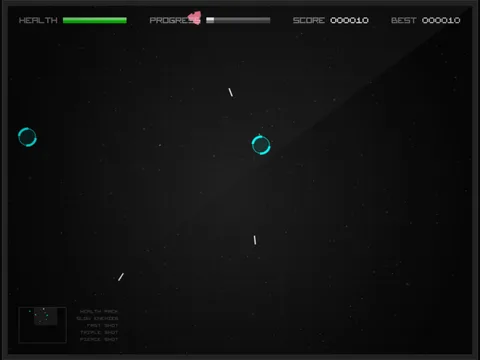
Your ship moves with the keyboard, but your gun follows the mouse. Radius Raid unblocked is a top-down space shooter where steering and aiming are two separate jobs, and keeping both going is the whole challenge. Enemies drift in from every side of a wide arena. Classroom 7x serves the game itself, so it opens in Chrome on a Chromebook with no download.
About Radius Raid
Jack Rugile built Radius Raid for the js13kGames contest in 2013, where entries must fit in 13 kilobytes. Every shape and sound effect is created in code. The arena is twice the size of your screen, and the camera follows your ship while layers of stars shift in the background. A mini-map shows enemies that are off screen. Your ship has momentum, so it keeps gliding and slows gently after you let go of the keys.
There are no enemy bullets. Health only goes down when an enemy is in contact with your ship, and the green bar keeps shrinking for as long as that contact lasts. To finish a level you need a certain number of kills, and every new level adds another enemy type until all 13 are in play. Some split into smaller foes, some are hard to see, and some release chasers. Five timed power-ups help you, and your stats are saved in the browser.
How to Play Radius Raid
- Click PLAY on the menu to start a round in the middle of the arena.
- Move your ship with W A S D or the arrow keys to stay away from enemies.
- Point the mouse at a target and hold the left button to fire a stream of shots.
- Fill the Progress bar with kills to reach the next level and meet a new enemy type.
- Grab power-ups like Triple Shot, Fast Shot or Slow Enemies to get through crowded moments.
Radius Raid Controls
| Input | Action |
|---|---|
| W / A / S / D or arrow keys | Move the ship |
| Move the mouse | Aim |
| Hold left mouse button | Fire |
| F | Turn autofire on or off |
| P | Pause or resume |
| M | Mute sound |
| Click menu buttons | Choose PLAY, STATS, CREDITS or MENU |
How to Play Radius Raid on PC & Chromebook
Radius Raid is designed for a keyboard and mouse, so a Chromebook or laptop is where it belongs. Your left hand steers with W A S D or the arrows while your right hand aims and fires with the mouse. On a touchpad, pressing F to turn on autofire makes things much easier, because you only need to point. P pauses and M mutes the sound.
- Open the game and click PLAY on the menu.
- Steer the ship with W A S D or the arrow keys.
- Aim with the mouse and hold the left button to shoot.
- Press F for autofire, or P to pause at any time.
Desktop tip: A plug-in mouse makes aiming far more precise than a touchpad, especially once faster enemy types join the arena.
How to Play Radius Raid on Mobile
Radius Raid does not work with touch screens. Moving the ship takes the keyboard and aiming takes a mouse pointer, and the screen has no buttons that could stand in for either. That makes phones and most tablets a poor fit. A school Chromebook or a laptop with a keyboard works well, and an external mouse makes it even better.
- Switch to a Chromebook, laptop or desktop computer.
- Open Classroom 7x in Chrome and start Radius Raid.
- Use the keyboard to move and the mouse or touchpad to aim.
Mobile tip: If you are using a touchpad, press F early in the round so the ship fires on its own.
Tips and Tricks
- Keep your ship gliding. Because it carries momentum, short taps let you slip past a chaser instead of stopping right in its path.
- Glance at the mini-map often. Dots show enemies outside the screen, so you can turn your aim toward a group before it arrives.
- Destroy splitters from a distance. Each one breaks into four smaller enemies, and you need room to deal with the pieces.
- Destroy spawners the moment they appear, since a spawner will go on sending out fast chasers for as long as it survives.
- Turn on autofire with F during long rounds. Your ship shoots toward the pointer on its own, so you can focus on moving and aiming.
Game Info
| Game | Radius Raid |
|---|---|
| Developer | Jack Rugile |
| Genre | Shooting, Action |
| Players | Single player |
| Works on | Chromebook, PC and Mac (keyboard required) |
| Price | Free, no sign-up |
| Hosting | Served from Classroom 7x's own servers |
| License | MIT (original source, license, credits) |
Radius Raid FAQ
How many kills do I need for each level?
You need 17 kills to clear level one. From there, the requirement grows by 7 per level. The Progress bar at the top shows how close you are to the next level.
Why did Radius Raid pause by itself?
The game pauses when its window loses focus, for example if you click outside it. Click RESUME or press P to keep playing from the same spot.
What does the STATS screen show?
It lists your best score and best level, plus totals for rounds played, kills, bullets fired, power-ups collected and time played. These numbers are saved in your browser on that device.