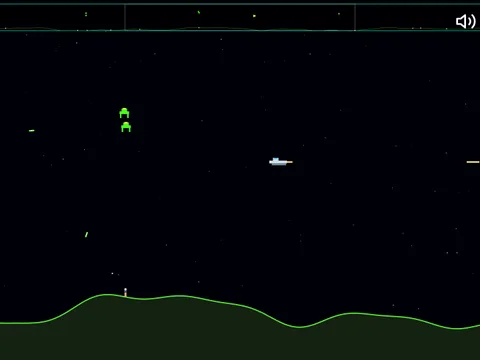
Planet Protector unblocked is a side-scrolling space shooter over a hilly green world that wraps around without end. Ten small humans walk on the ground, and alien landers keep diving to snatch them. To fight back, you get a rapid-fire laser, a small supply of smart bombs and a hyperspace jump that carries real risk. Classroom 7x hosts it on its own servers, so it launches in Chrome with no download.
About Planet Protector
Frank Force built this shooter with his LittleJS engine under the original name Protector, and every sprite is drawn in code. Rescue is your main job. Across the top, a radar strip displays the entire map, which helps you see landers diving at people. Hit a lander while it carries a human and you get 500 points as that person falls. Catch them before the drop gets too long, then bring them to the ground for another 500.
A lander that makes it to the top with its captive becomes a mutant, which is faster and more dangerous. If every human is lost, the planet explodes, and three waves of mutants follow before it is rebuilt. Later waves add new enemies, such as purple drifters that break into chasers and bombers that leave mines behind. You get three ships, plus an extra ship and smart bomb for every 10,000 points.
How to Play Planet Protector
- Fly with the arrow keys or W A S D, and use the radar at the top to find landers.
- Press Z or Space to fire your laser, and hold it down for rapid fire.
- Shoot landers before they grab a human, or shoot a carrier and catch the person as they fall.
- Press X to set off a smart bomb when the screen gets crowded with enemies.
- Clear all landers and mutants to finish the wave and earn bonus points for every human still alive.
Planet Protector Controls
| Input | Action |
|---|---|
| Arrow keys / W A S D | Fly up, down, left and right |
| Z or Space (hold for rapid fire) | Fire the laser |
| X | Smart bomb |
| C | Hyperspace jump |
| Esc or the menu icon (top right) | Pause |
| Left pad and right buttons (touch) | Steer, fire, bomb and jump on phones and tablets |
How to Play Planet Protector on PC & Chromebook
Planet Protector is built for the keyboard, and on a laptop or Chromebook you will want both hands on the keys. Use the arrow keys or W A S D to fly, and Z or Space to fire. X sets off a smart bomb and C triggers hyperspace. If you have a game controller, you can connect it and use that instead.
- Click inside the game area once so it receives your key presses.
- Fly with W A S D or the arrow keys and keep an eye on the radar strip.
- Hold Z or Space for rapid fire as you chase landers.
- Press X for a smart bomb, C for hyperspace, and Esc to pause.
Desktop tip: Steer with the arrow keys and keep your left hand near Z, X and C. That way firing, bombing and jumping all stay right under your fingers.
How to Play Planet Protector on Mobile
Planet Protector has on-screen controls for phones and tablets. A pad on the left side steers your ship, and a group of buttons on the right handles the laser, smart bombs and hyperspace. Hold your device sideways so you can see more of the planet and keep both thumbs on the controls. The menu icon in the top right pauses the game.
- Turn your phone or tablet sideways before you start.
- Steer with the pad on the left using your left thumb.
- Use the buttons on the right to fire, drop a smart bomb or jump.
- Tap the menu icon in the top right to pause.
Mobile tip: Keep your right thumb close to the fire button. Most of the game is steady shooting, and you only need the bomb or jump buttons in emergencies.
Tips and Tricks
- Head first for landers that are close to the ground on the radar. They are the ones about to grab someone.
- Hit landers while they are still descending. Taking one out before it grabs a human spares you a risky midair rescue.
- Your laser only fires the way the ship faces. Tap the opposite direction to turn around and hit enemies behind you.
- Keep smart bombs for big swarms. Each one wipes out everything on the screen and removes enemy shots, which is useful once the small chasers show up.
- Finish each wave quickly. The longer a wave drags on, the more fast white hunters show up to chase you.
Game Info
| Game | Planet Protector |
|---|---|
| Developer | Frank Force |
| Genre | Shooting, Action |
| Players | Single player |
| Works on | Chromebook, PC, Mac, tablet and phone |
| Price | Free, no sign-up |
| Hosting | Served from Classroom 7x's own servers |
| License | MIT (original source, license, credits) |
Planet Protector FAQ
Is hyperspace safe to use?
No. A jump puts you somewhere random with a brief shield, yet roughly one jump out of seven wrecks your ship. Treat it as a final escape for moments when enemies have you trapped.
What happens if every human is lost?
Every lander still in the air turns into a mutant when the planet explodes. Three waves of nothing but mutants follow, and once you survive them, the planet comes back with ten new humans.
Do falling humans always need to be caught?
Only after a high fall. Humans who drop from close to the ground land safely without help, but a long fall kills them unless you get under them first.