No score, no timer, just keys that make sound the moment you press them. Tiny Synth Piano unblocked is a small music toy for playing simple tunes, big chords and silly sound effects of your own. Classroom 7x hosts it on its own servers, so it runs in Chrome on a Chromebook with no download and no sign-up needed.
About Tiny Synth Piano
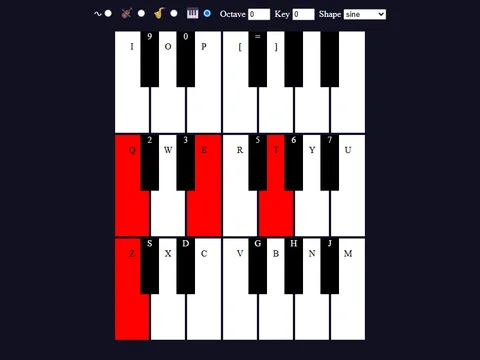
Frank Force first built this piano as 1Keys, a working instrument that fit into roughly one kilobyte of JavaScript code. The page you see here is an improved edition he made later, adding key labels and extra controls. Every note is created live by your browser with the Web Audio API instead of being loaded from recordings, so sound starts instantly. Its 36 keys sit in three rows of one octave each, stacked so the deepest notes are on the bottom row.
You can switch between four voices with the buttons at the top: an organ sound, which is selected at the start, plus brass, strings and a plain single tone. To go from soft to buzzy, pick sine, square, sawtooth or triangle in the Shape menu, and that wave is used for every voice. The Octave control moves the whole piano up or down, and Key shifts every note by half steps, letting you move a tune into a different key.
How to Play Tiny Synth Piano
- Press a letter on the bottom row of your keyboard, starting with Z, to play the lowest octave.
- For the middle octave, use the same pattern one level higher, on the Q row plus the number keys over it.
- Reach the top octave with I, O, P and the two bracket keys, or click any key on screen with the mouse.
- Hold several keys at once to play chords, since every note sounds on its own until you let go.
- Try the voice buttons, the Shape menu and the Octave and Key arrows to change your sound.
Tiny Synth Piano Controls
| Input | Action |
|---|---|
| Z X C V B N M, plus S D G H J | Play the lowest octave |
| Q W E R T Y U, plus 2 3 5 6 7 | Play the middle octave |
| I 9 O 0 P [ = ] | Play the top octave |
| Mouse press / drag | Play a key, or sweep across keys with the button held |
| Touch and hold | Play keys on a touch screen |
| Voice buttons, Shape menu, Octave and Key arrows | Change the sound, pitch range or musical key |
How to Play Tiny Synth Piano on PC & Chromebook
Tiny Synth Piano feels best with a physical keyboard on a laptop or Chromebook, because each letter key plays a note and you can press several at once for chords. The mouse works too, which is handy for the unlabeled top keys and for sweeping across a row. Click the piano once after it loads so your key presses reach it.
- Click the piano once so it can hear your keyboard.
- Play the low octave on the Z row and the middle octave on the Q row.
- Pick a voice at the top and a wave in the Shape menu.
- Use the Octave and Key arrows to shift the pitch.
Desktop tip: Use headphones in class. The sawtooth and square waves can be loud and buzzy on laptop speakers.
How to Play Tiny Synth Piano on Mobile
You can play Tiny Synth Piano on a phone or tablet by touching and holding the piano keys, and several fingers can play a chord together. The letter-key layout does not apply on touch screens, though, and the 36 keys get small on a phone. A tablet gives your fingers more room, and a Chromebook keyboard unlocks the full typing layout.
- Turn your device sideways so the keys are wider.
- Touch and hold a key to play a note, and lift to let it fade.
- Tap the voice buttons and the Shape menu to change the sound.
Mobile tip: If you hear nothing at first, tap a key once more. Some phones only start sound after the first touch.
Tips and Tricks
- Play one note with each of the four wave shapes on the same voice. A square wave sounds very different from a sine wave.
- Try the duplicate keys: comma, L, period, semicolon and slash. Each one copies an opening note of the middle octave, which makes quick runs easier.
- Change the Key setting to move a song you know into a new key while keeping the same finger pattern.
- Lower the Octave for deep bass notes on the bottom row, then add chords on the Q row above them.
- Hold the mouse button and sweep across a row to play a fast scale with one smooth motion.
Game Info
| Game | Tiny Synth Piano |
|---|---|
| Developer | Frank Force |
| Genre | Casual |
| Players | Single player |
| Works on | Chromebook, PC and Mac (touch screens work, mouse is more precise) |
| Price | Free, no sign-up |
| Hosting | Served from Classroom 7x's own servers |
| License | GPL-3.0 (original source, license, credits) |
Tiny Synth Piano FAQ
Why did the sound stop when I clicked somewhere else?
When the piano's window loses focus, it lets go of all held notes on purpose, so nothing can keep ringing forever. Click back on the piano and you can keep playing right where you left off.
Why do some top keys have no letters?
There are not enough keys on a computer keyboard to cover the very top of the range. A few of the highest notes have no letter printed on them, but a mouse click or a finger tap still plays them just fine.
How do I use the Octave and Key boxes?
Click their arrows. Octave shifts the whole piano by up to three octaves. Key moves the pitch in half steps, and it can go as far as twelve higher or twelve lower. Typing directly into the boxes is blocked.