The Great Train Robbery unblocked is a planning game where the real action happens before the train ever arrives. You build a gang, give them orders and then watch the plan succeed or fall apart. It loads from Classroom 7x's own servers, so you can play in Chrome on a Chromebook without a download or an account.
About The Great Train Robbery
Ondřej Žára created this game for the 2026 Seven Day Roguelike Challenge. A train full of gold will soon pass through a small Wild West town, and you get $4,000 to get ready. You start by hiring townsfolk, and their names often hint at a trait, such as being tough, sick, cheap, speedy or slow. After that, you shop at the general store for horses, revolvers, rifles and dynamite. Every person can hold one weapon and one horse.
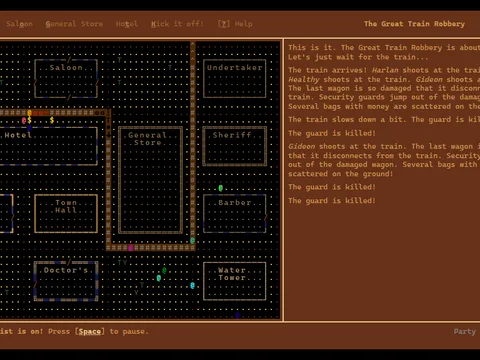
The heart of the game is the plan. You give every gang member a starting spot in town and an ordered list of tasks, and each person always tries the first task they can. Some buildings can be walked through, while others only give roof access. Once the robbery starts, you cannot steer anyone. The town is drawn entirely with text characters, and a running log reports every shot. Each game builds a new random town from a seed you can view.
How to Play The Great Train Robbery
- Press Enter on the intro screen, then press O to see who in town is for hire.
- Visit the general store with G and buy weapons and horses for each member.
- Press T to open the planning screen, set each starting location and add tasks.
- Put the most specific tasks at the top, since people run the first possible one.
- Start the heist, watch the log, and retry with a tweaked plan if it fails.
The Great Train Robbery Controls
| Input | Action |
|---|---|
| Enter / Escape | Continue or confirm / cancel a dialog |
| E | Change the random seed shown on the intro screen |
| M / O / G / T / K | Town map, hiring list, store, planning screen, start screen |
| ? | Show the help text |
| 1 to 0 | Choose a person, item, location or task in a list |
| H / F and P / S | Hire or fire, purchase or sell |
| L / A / R | Set location, add task, remove task |
| Up / Down arrows | Move the selected task up or down |
| B | Go back to the party list |
| Space (then A) | Pause the heist (abort while paused) |
| 1 / 3 / 5 after the heist | Retry, rehire in the same town, or new town |
How to Play The Great Train Robbery on PC & Chromebook
The Great Train Robbery is played entirely with the keyboard, so a Chromebook or laptop is the way to go. Every available key is marked on the screen, and pressing ? opens the help text. Planning takes a little reading, so give yourself a few minutes for the first heist. The display scales down to fit the game frame on smaller laptop screens.
- Press Enter to leave the intro, or press E first to change the seed.
- Use O, G and T to hire people, buy gear and write the plan.
- Set each person's location with L and add tasks with A.
- Press Space during the heist to pause and read the log.
Desktop tip: Press ? whenever you forget a key. The help text explains what each screen does and keeps you from guessing.
How to Play The Great Train Robbery on Mobile
The Great Train Robbery needs a physical keyboard, because every action is a key press and there are no mouse or touch controls. That means phones and tablets cannot run the planning screens. For the full heist, open Classroom 7x on a Chromebook, laptop or desktop with a keyboard. A school Chromebook is a good fit for this one.
- Move to a Chromebook, laptop or desktop with a keyboard.
- Open The Great Train Robbery in Chrome.
- Press Enter on the intro screen and start hiring your gang.
Mobile tip: Planning a heist can take a while, so save this game for a longer break when you are sitting at a computer.
Tips and Tricks
- Always include the task for collecting gold looted from the train. Without it, nobody picks up the bags and the heist scores zero.
- Order each task list from specific to general. An attack on train guards placed above an attack on gold wagons lets people react when guards appear.
- Do not send your gold collectors to rooftops. Roof shooters get extra range but cannot climb down to grab the bags.
- Arm everyone in your crew. Without a weapon, a person can only punch for 1 damage, but guards are able to shoot from several tiles away.
- Hire carefully, because your final score is split across everyone you hired, including anyone who did not make it through the heist.
Game Info
| Game | The Great Train Robbery |
|---|---|
| Developer | Ondřej Žára |
| Genre | Adventure |
| Players | Single player |
| Works on | Chromebook, PC and Mac (keyboard required) |
| Price | Free, no sign-up |
| Hosting | Served from Classroom 7x's own servers |
| License | MIT (original source, license, credits) |
The Great Train Robbery FAQ
Can I control my gang during the robbery?
No. Once the heist starts, everyone follows the tasks you gave them. You can press Space to pause and read the log, or abort, but the real control happens during planning.
How is the score worked out?
Your remaining money is combined with the gold your party carries, and the total is divided evenly among everyone you hired. If the party lost everyone or took no gold at all, the score is zero.
Can I retry the same plan?
Yes. Once the heist ends, press 1 to replay the same town with your same crew and plan. Press 3 to keep the town but redo your hiring. Pressing 5 generates a completely new town.